Practical Guide to Airbnb Promotions
When used strategically, discounts can help you fill your calendar, boost visibility, and appeal to price-conscious travellers.
To get the most value from discounts:
-
Be strategic - apply discounts to dates where you need more bookings (e.g. low season, weekdays). Use them to boost visibility during slower periods.
-
Set limitations - use booking windows so discounts only apply when it suits you. This helps you protect your high-demand dates.
-
Use data insights - review which discounts lead to bookings and adjust your strategy based on results. See performance trends and focus on offers that actually increase occupancy and revenue.
In this article, you will learn what types of discounts exist for Airbnb, how they are displayed to guests, how stacking works, and how to manage discounts in Rentals United.
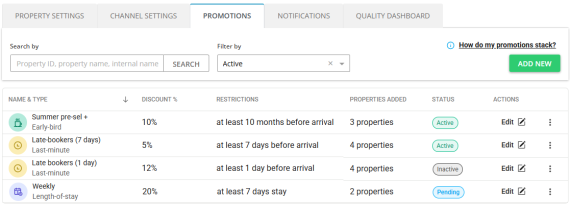
Related articles
Supported types of promotions and discounts
| Promotion / Discount |
Rentals United |
Where to set |
|---|---|---|
|
New Listing Promotion |
✅ |
Property Settings > Channel Settings > New Listing Promotion |
|
Seasonal discounts |
✅ |
Edit property > Step 5: Price and availability > Discounts |
| Promotions | ✅ | Property Settings > Promotions |
| Non-refundable rate | ✅ | Property Settings > Channel Settings > Non-refundable rate |
| Seasonal adjustments (rule sets) | ❌ | Set in Airbnb, read more here |
| Custom promotions | ❌ | Set in Airbnb, read more here |
Promotions differ from seasonal discounts. While they serve the same purpose (discount the price) and can be used interchangeably, you need to remember about the key differences.
Seasonal discounts:
-
Defined on the property level (in Step 5: Price and availability)
-
Can change per season
-
Higher priority
Promotions:
-
Defined per account or per listing (in the Promotions tab)
-
Global approach to promotions
Airbnb promotion types
Airbnb discounts are based on certain conditions (e.g. booking in advance or staying multiple nights). They appear automatically on the Airbnb website to guests when they meet the criteria.
| Early-bird |
Last-minute |
Length-of-stay (weekly, monthly) |
|---|---|---|
|
Discount for guests who book far in advance |
Discounts for bookings made shortly before check-in |
Price reductions applied when guests stay longer |
| Example promo: 10% for bookings made 2 months and more before the check-in | Example promo: 10% for bookings made 3 days and less before the check-in | Example promo: 10% for weekly stays, 15% for monthly stays |
| Best for: Securing future occupancy and improving forecastability. |
Best for: Filling gaps and reducing unbooked nights at the last minute. |
Best for: Increasing average stay, reducing turnover and cleaning costs. |
Read more on how to add new, edit and remove these promotions here.
Guest view
Long-term and early-bird discounts are promoted to guests on the Airbnb website and are a great way of boosting reservations. These promotions will be highlighted next to your original price in the price breakdown on your listing.
-
A line-item discount breakdown on your listings and at checkout.
-
A strikethrough on your nightly price in search results and on your listing.
-
Guests who have searched listings in your area recently may see your listings featured in Airbnb emails.
Last-minute discounts are deducted from the nightly price, but are not actively promoted or displayed to guests on the Airbnb website.

Figure 1: Length-of-stay as a line-item on the listing.
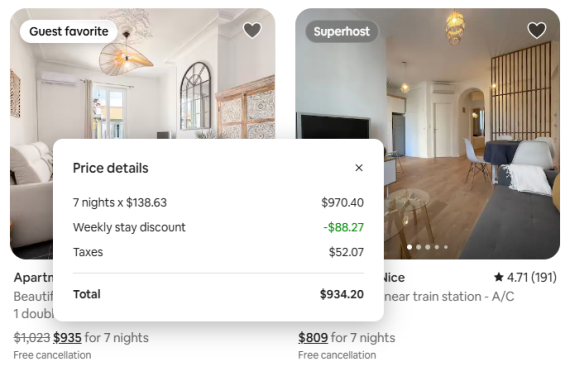
Figure 2: Length-of-stay as a strike through in search results.
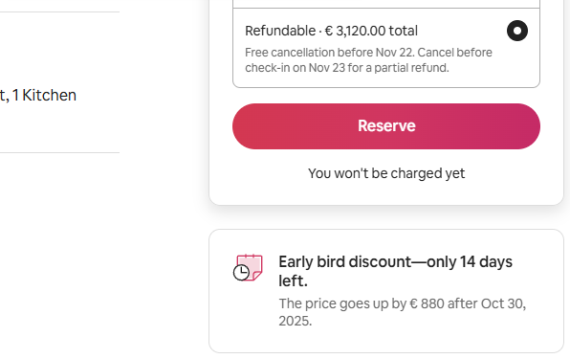
Figure 3: Early-bird special callout on the listing page
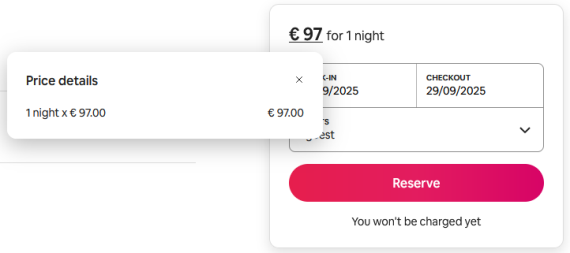
Figure 4: Last-minute included in the price, but not actively promoted
Host view
Your promotions will be applied to your listings, but also displayed in the Airbnb dashboard.
-
Log in to you Airbnb dashboard.
-
Go to Calendar and select the listing on the left.
-
Click Price settings. The promotion details are displayed in the More discounts section.
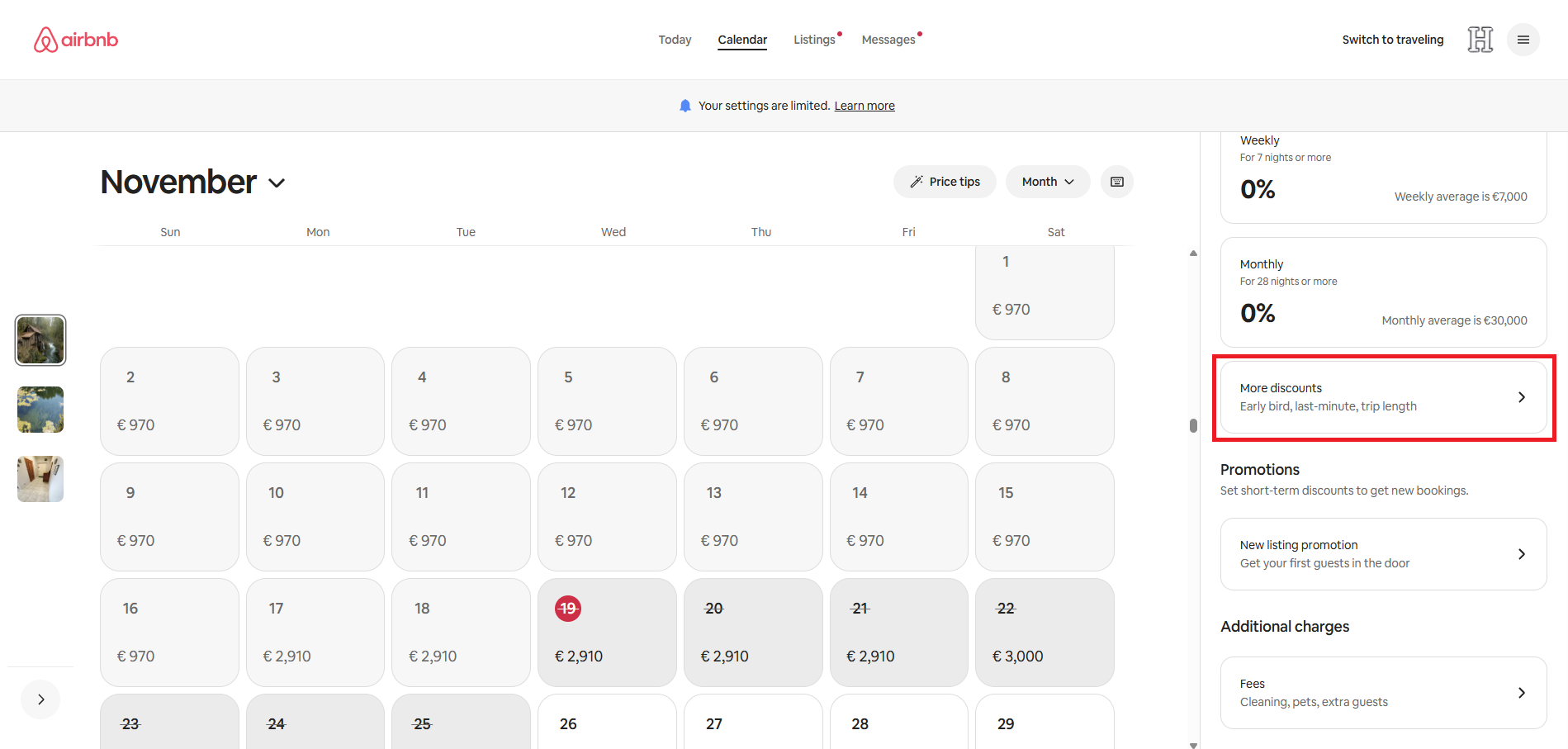
Discount amounts in Rentals United
After your guests book a stay where a discount was applied, you will be able to view the exact discounted amounts in the reservation price breakdown.
Go to Guest Planner and open any booking to see the price breakdown details.
Stacking and priority rules
Discounts do not stack in Airbnb. Airbnb prevents you from overdiscounting your rates.
-
If you set up multiple types of discounts for the same time period (e.g. lengths-of-stay and early-bird), only one will apply per night. It is always the highest-priority discount that will always apply and override the others.
-
If you have multiple discounts of the same type (e.g. weekly and monthly), the one that is the most beneficial for the guest will apply.
Check below the order of applying discounts:
-
New Listing Promotion
-
Custom promotions
-
Seasonal discounts
-
LOS discount
-
Early-bird discount
-
Last-minute discount
-
-
Promotions
-
Length-of-stay
-
Early-bird
-
Last-minute
-
-
Non-refundable discount
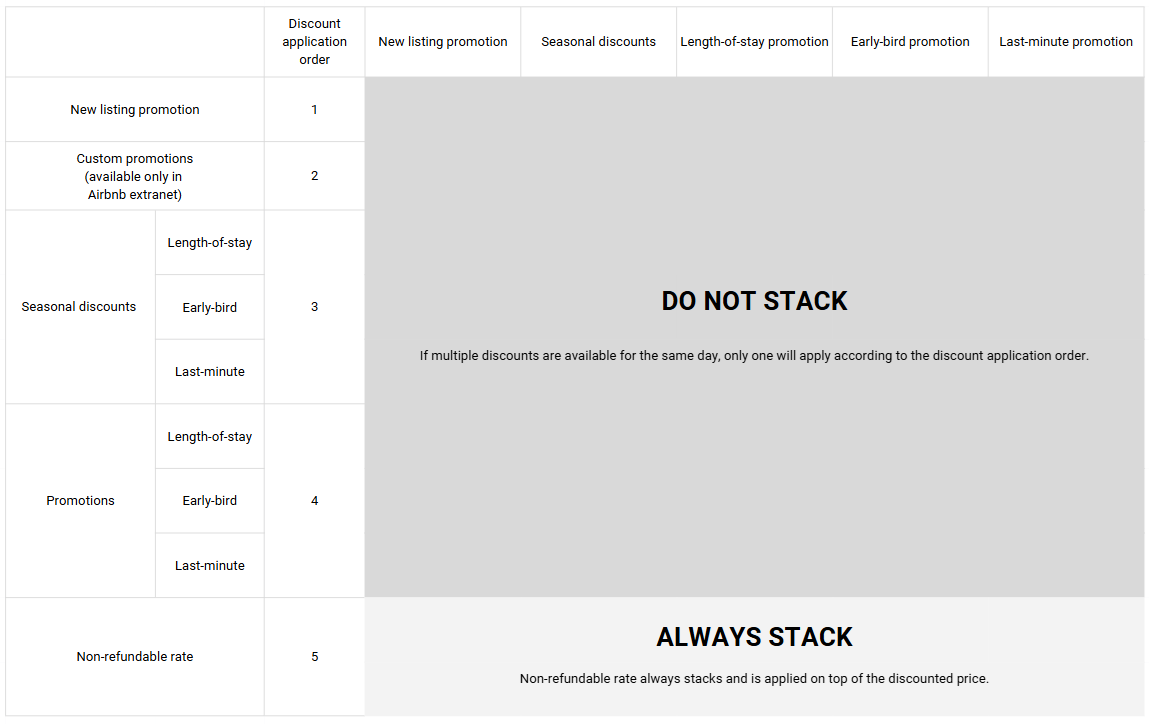
Practical use: Promo stacking and priorities
➡ Example I: I already have early-bird and weekly discounts activated in my account. I want to enable New Listing Promotion, but at the same time I want to avoid offering unprofitable rates.
-
Base rate: $100
-
No seasonal discounts
-
Active discounts:
-
Early-bird promotion: 10%
-
Length-of-stay promotion: 15%
-
New Listing Promotion: 20% fixed discount
-
I. Discounted rate - New Listing Promotion
If New Listing Promotion is active, Airbnb disregards any other discounts as New Listing Promotion has the highest priority of all.
$100 - 20% = $80
New Listing Promotion is a temporary offer that automatically turns off after your listing receives three bookings. Once it is deactivated, Airbnb will revert to the next eligible discount based on the priority order.
II. Discounted rate - Length-of-stay
If a guest qualifies for both Early-bird and Length-of-stay, Airbnb will apply the Length-of-stay discount, as it has a higher priority.
$100 - 15% = $85
III. Discounted rate - Early-bird
If a guest qualifies for Early-bird, but the stay is too short to qualify for the Length-of-stay discount, Airbnb will apply the Early-bird discount only.
$100 - 10% = $80
Final outcome: Discounts do not stack, but apply according to the priorities. Airbnb protects your listings from accidental over-discounting by limiting the number of discounts that can apply at a time.
➡ Example II: I have both seasonal discounts and promotions. How will discounts apply?
-
Base rate: $100
-
Seasonal discounts:
-
Seasonal Last-minute discount: 3%
-
Season: from 1 October to 14 October
-
-
Promotions:
-
Last-minute: 10%
-
Discounted rate - only one discount applies per night
There is a booking from 27 September until 3 October. Seasonal discounts normally have higher priority than promotions. However, since the seasonal last-minute discount only covers part of the stay, the last-minute promotion is applied to the remaining nights that fall outside the seasonal period.
-
Discounted rate (27 - 30 Sep): $100 - 10% (Last-minute promotion) = $90
-
Discounted rate (1 - 3 Sep): $100 - 3% (seasonal Last-minute discount) = $97
Total booking amount: 3 x $90 + 3 x $97 = $561
Final outcome: Discounts do not stack, but apply according to the priorities.
➡ Example III: I have both seasonal discounts and promotions. I want to introduce a Non-refundable discount to the set-up from Example II.
-
Non-refundable discount: 10%
Discounted rate - Non-refundable rate always stacks
There is a booking from 27 September until 3 October. Non-refundable rate is calculated with the lowest priority from the total booking amount.
-
Discounted rate (27 - 30 Sep): $100 - 10% (Last-minute promotion) = $90
-
Discounted rate (1 - 3 Sep): $100 - 3% (seasonal Last-minute discount) = $97
Total booking amount: 3 x $90 + 3 x $97 = $561
Non-refundable rate: $561 - 10% = $504.90
Final outcome: Non-refundable discount stacks with other discounts and applies to your nightly price after all other discounts are calculated.
FAQ
When to decide on setting up a promotion?
-
If your property is not performing, start planning your discount strategy.
-
Do not wait and be proactive - check reservations in advance to identify low occupancy.
-
Consider seasonality: high and low seasons may require different strategies.
How should I approach setting up a promotion?
-
Evaluate if your property is profitable before adding discounts.
-
Make small, incremental changes rather than dramatic discounts.
-
Be creative: run your own promotions like "three plus one" (most bookings occur Friday–Sunday, so avoid leaving gaps Monday–Wednesday).
When is the best time to set up a promotion?
-
Set promotions strategically (e.g. at the end of the month).
-
Offer discounts based on your guests booking habits (e.g. offer early bird discounts to secure revenue from guests who book early).
How to evaluate which promotion is best?
-
Check if similar properties are performing well with specific discounts.
-
Learn from peers’ experiences, e.g., see the impact of removing an early bird promotion case study