Archived properties hidden from Property Settings
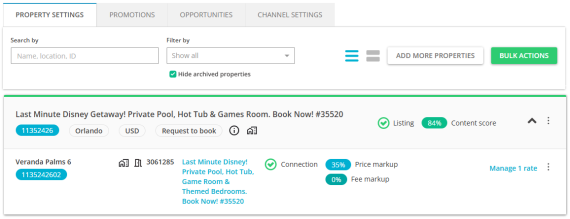
By default, your Property Settings will not include archived properties. This option will help you keep the view clean and tidy and focus more when managing large property portfolios. You can change this setting by unchecking the box anytime.
-
Go to Property Settings.
-
Locate the Hide archived properties checkbox.
-
By default, the checkbox is selected, which means archived properties are hidden from the list.
-
To view archived properties again, simply uncheck the box.
What happens when I hide archived properties?
They will be removed from your property list view, helping you focus on active listings.
Can I view archived properties again?
Yes. Uncheck the Hide archived properties option to include them back in your view.
Property Settings doesn't include all of my properties. Some of them dissapeared.
Yes, it has happened because the Hide archived properties option is turned on by default. Uncheck the Hide archived properties option to include archived properties back in your view.