Practical Guide to Vrbo Promotions
In this article you will learn about promotion types available in Rentals United and the differences between promotions and discounts. You will be able to choose the most effective and beneficial promotion for your business. Also, you will see how promotions are presented to the Vrbo travellers and will learn step by step how promotions are applied to the price.
Related articles
Benefits of Vrbo Promotions
Promotions on Vrbo help your property stand out and attract the right guests at the right moment. They give you more control over visibility, targeting, and demand across different seasons.
-
Increased visibility in search results with a special badge for discounts of 5% or more.
-
Better targeting and higher-value bookings by focusing on specific guest groups, including high-spending members.
-
Flexible demand-building tools that let you adjust strategies anytime, from early-booking offers to mobile-only or length-of-stay promotions.
Managing Vrbo promotions manually is time-consuming, inefficient, and prone to errors – especially when working with large portfolios. With Rentals United, you can manage all your Vrbo promotions in one place, in bulk, with just a few clicks, saving time, reducing mistakes, and optimizing performance across every listing without ever logging into Vrbo.
Supported promotion types
| Vrbo promotion / discount | Available in Rentals United | Where to set |
|---|---|---|
|
Promotions (Early-booking, Last-minute, Mobile-only and Member-only) |
✅ |
Property Settings > Promotions |
|
New listing discount promotions |
❌ |
Set in Vrbo, see here |
|
Lodging discounts |
✅ |
Edit property > Step 5: Price and availability > Discounts |
Promotions and seasonal discounts differences
Promotions differ from seasonal discounts. While they serve the same purpose (discount the price) and can be used interchangeably, you need to remember about the key differences.
Seasonal discounts:
-
Defined on the property level (in Step 5: Price and availability)
-
Can change per season
-
Higher priority
Promotions:
-
Defined per account or per listing (in the Promotions tab)
-
Global approach to promotions
Vrbo promotion types
| Early-bird | Last-minute | Mobile-only | Member-only |
|---|---|---|---|
|
Secure steady bookings by offering discounts to guests who book in advance |
Maximise peak-season revenue by attracting price-savvy guests |
Reach more travellers and boost traffic with mobile-only discounts |
Attract trusted, high-value travellers with member-only discounts. |
|
Example promo: 10% for bookings made 2 months and more before the check-in |
Example promo: 10% for bookings made 3 days and less before the check-in |
Example promo: 10% for bookings made on mobile device |
Example promo: Blue: 10% Silver: 15% Gold: 20%
Note: Gold member discounts are also displayed to platinum members. |
|
Best for: Securing future occupancy and improving forecastability. |
Best for: Filling gaps and reducing unbooked nights at the last minute. |
Best for: Capture predictable demand from desirable guests by increasing your mobile visibility. |
Best for: Attracting valuable guests who book earlier, stay longer, and spend more than non-members. |
Guest view
Vrbo offers several merchandising features to boost your visibility among guests, including:
-
Badges that highlight discounted listings
-
Price strikethroughs that show the original price
-
Discount labels on search results, property pages, and checkout
-
Search filters that let guests find discounted properties easily
The table below summarizes the discount required to unlock each merchandising feature.
| Promotion type | Strikethrough * | Badging and strikethrough * | Recommended discount * |
|---|---|---|---|
|
Early-bird |
1% |
5% |
10% |
|
Last-minute |
1% |
5% |
10% |
|
Mobile-only |
1% |
5% |
10% |
|
Member-only |
Blue: 10% Silver: 11% Gold: 12% |
Blue: 10% Silver: 15% Gold: 20% |
Blue: 10% Silver: 15% Gold: 20% |
* Data source: Vrbo Help Centre
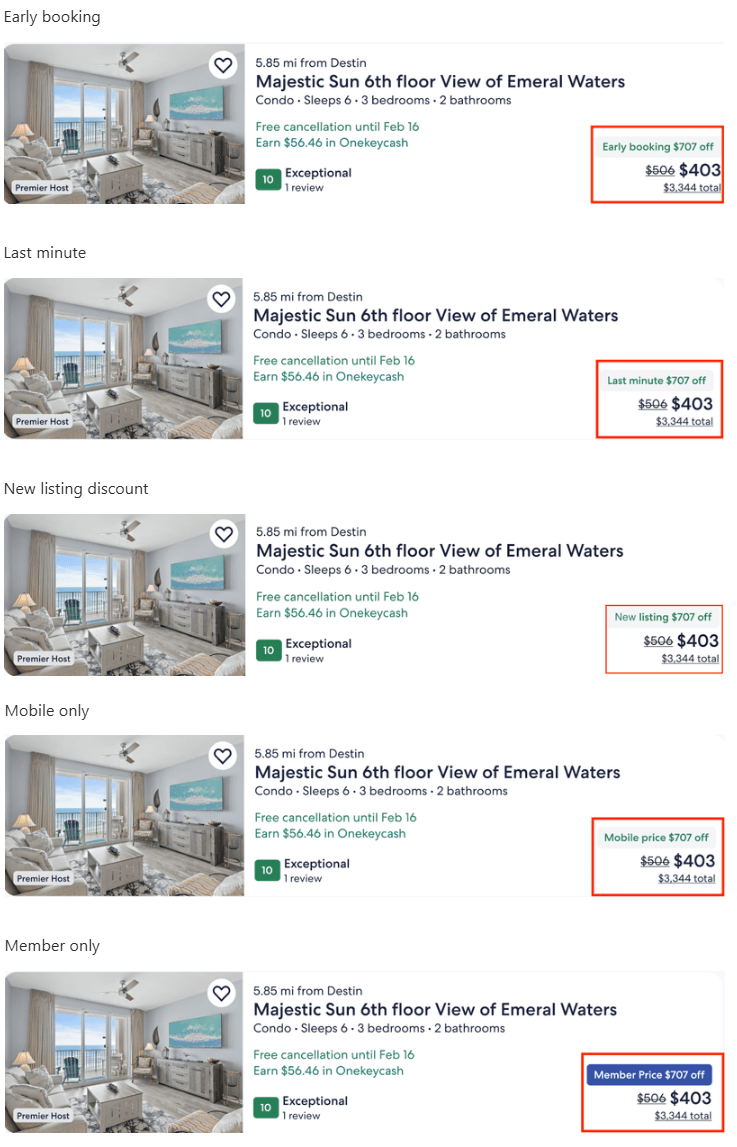
If multiple promotions are applied to a property at the same time, the merchandising features are prioritised in the following order:
-
New listing discounts (set it in Vrbo)
-
Early-booking or last-minute promotions
-
Member-only promotions
-
Mobile-only promotions
Below you can preview how your promotions will be visible to the guests.
Discount amounts in Rentals United
After your guests book a stay where a discount was applied, you will be able to view the exact discounted amounts in the reservation price breakdown.
Go to Guest Planner and open any booking to see the price breakdown details.
Stacking and priority rules
Promotions do not stack with other promotions. It means you can create multiple promotions for your listing, but Vrbo will only apply one at a time - the one that is the most beneficial for the guest.
Example: You create two promotions: a 10% Member-only promotion and a 15% Last-minute promotion. If a guest qualifies for both, Vrbo will only apply the 15% Last-minute promotion because it gives the guest the bigger discount.
At the same time, promotions stack with seasonal discounts (such as weekly or monthly - see here). Vrbo will apply all of them, according to a specific order. Note that this may result in a double discount or a higher discount than expected.
Check below the order of applying discounts:
-
Seasonal discounts
-
Promotions
Example: Your base rate is $100. You have one seasonal (weekly) discount of 15% and one member-only promotion of 10%. Vrbo first applies the seasonal discount, reducing the price to $85. Then the promotion is applied to the discounted rate, resulting in a final price of $76.50.
Example: If a booking qualifies for multiple seasonal discounts (e.g. 5% and 10%), then the discount value is combined. If your base rent is $100, Vrbo applies the combined 15% discount, reducing the price to $85. This case does not apply to promotions, but only the seasonal discounts.
Practical use: Promo stacking and priorities
➡ Example I: I have both seasonal discounts and promotions. How will discounts apply?
-
Base rate: $100
-
Seasonal discounts:
-
Seasonal Last-minute discount: 3%
-
Season: from 1 October to 14 October
-
-
Promotions:
-
Last-minute: 10%
-
Discounted rate - only one discount applies per night
There is a booking from 27 September until 3 October. Seasonal discounts normally have higher priority than promotions. However, since the seasonal last-minute discount only covers part of the stay, the last-minute promotion is applied to the remaining nights that fall outside the seasonal period.
-
Discounted rate (27 - 30 Sep): $100 - 10% (Last-minute promotion) = $90
-
Discounted rate (1 - 3 Sep): $100 - 3% (seasonal Last-minute discount) = $97
Total booking amount: 3 x $90 + 3 x $97 = $561
Final outcome: Discounts do not stack, but apply according to the priorities.