Once you establish the connection with the channel, Rentals United informs you about the status of the channel connections. Read the brief summary below.
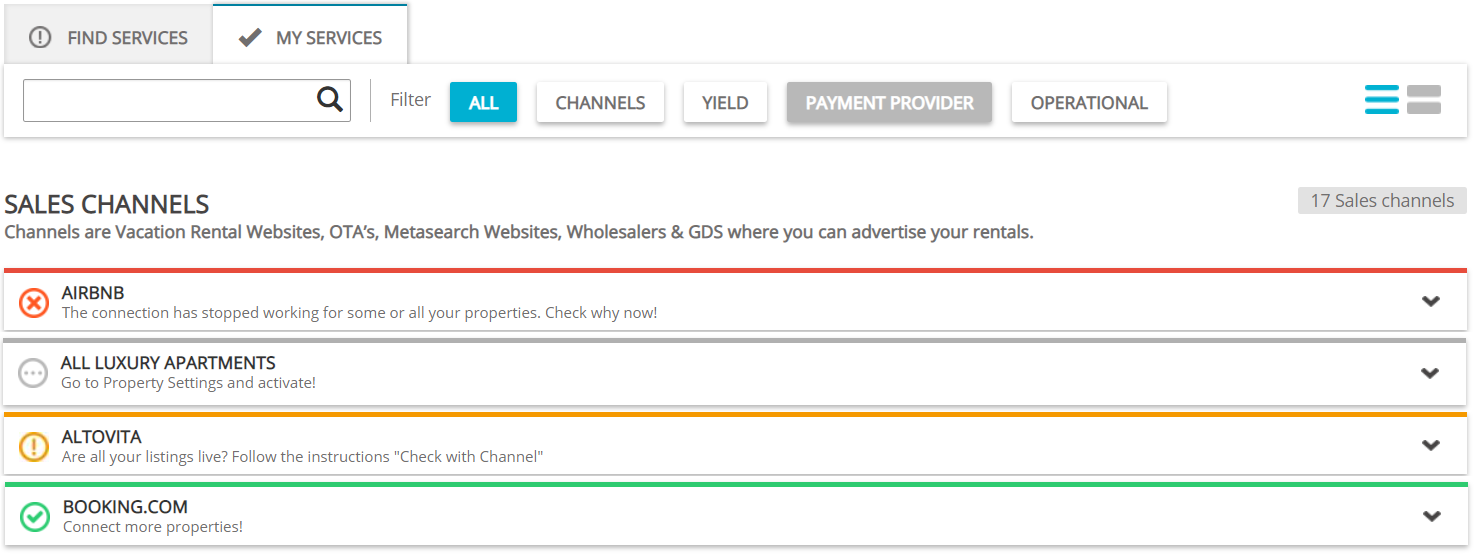
- Grey label indicates that there are no properties whose connection with the channel is active at the moment. Once your properties get listed on the channel's website, the status updates.
- Red label indicates that some errors occurred in the connection between Rentals United and the channel. You can unfold the section and click the Errors tab. There you can find information such as the number of errors, the date they occurred and the detailed description. You can also attempt to fix them directly in Rentals United. If the indicated actions do not solve the error, contact the Rentals United Support Team.
- Orange label indicates that some properties may require your attention. This usually means that there is some action to be performed on the sales channel's side or Rentals United cannot verify if the property is live (this usually happens for channels of the PULL type). If the warning status does not update, please contact the channel Support Team in the first place or contact the Rentals United Support Team.
- Green label indicates that there are no errors and properties' connections the channel are active.
Watch our video to see what channel statuses mean.