Co-hosts are the people who help you manage your listing in Airbnb. You can learn more about them in:
View messages from co-hosts
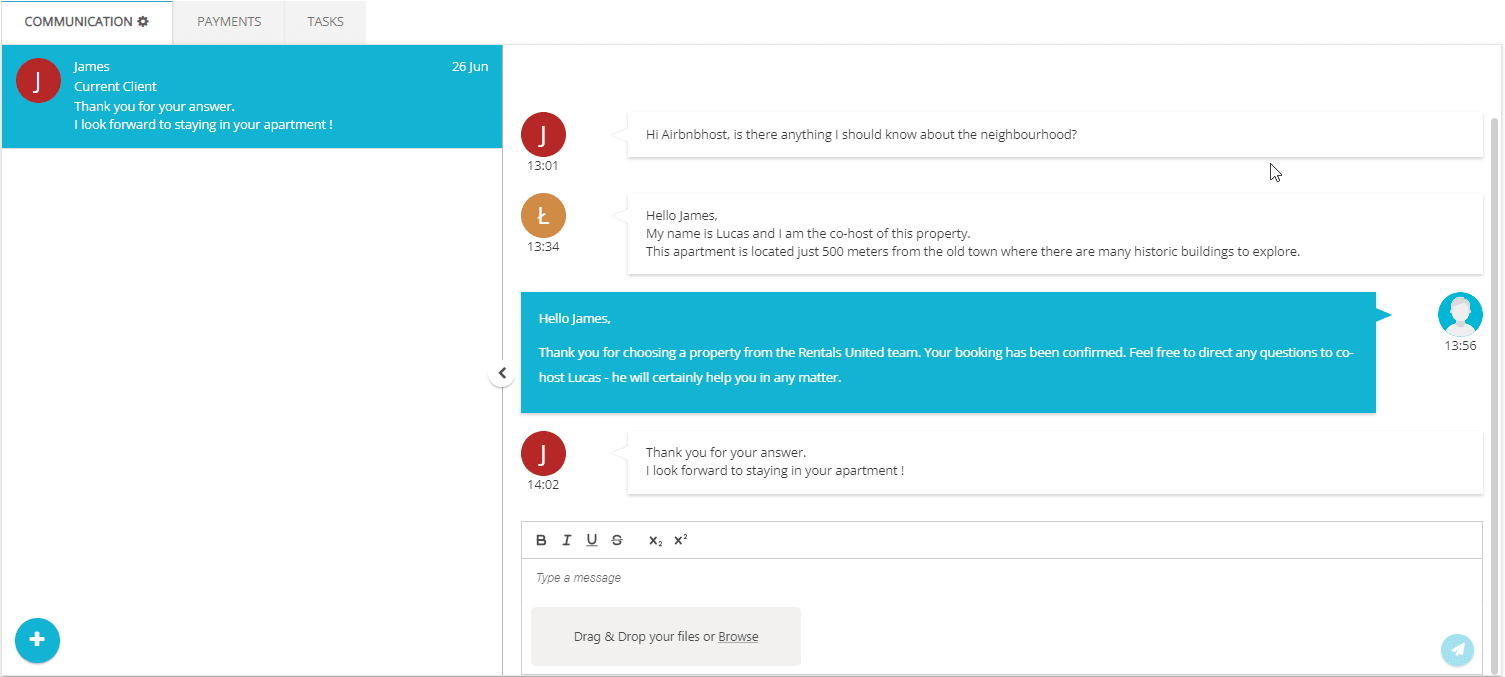
Co-hosts can manage your communication with the guests. Once they have the right permissions assigned in Airbnb and write to the guest via Airbnb, you can see their messages in Rentals United platform and API.
All parties access the messages. Co-hosts receive all messages sent from Rentals United and hosts can view the co-hosts' reviews in Rentals United platform and API.
Enable co-host management
Follow the steps in Adding co-hosts to your listing on the Airbnb website to invite co-hosts to manage the properties.
Step by step:
- Invite co-hosts to join your listing in Airbnb.
- Provide co-hosts with specific permissions in Airbnb. Select “Full access” or “Calendar and inbox access" to correctly process messages and display them in Rentals United.
No messages from co-hosts
If messages from co-hosts don't display in Rentals United, verify the following:
- Make sure that you added correct co-hosts to the correct property in Airbnb.
- Make sure that you granted co-hosts the necessary permissions in Airbnb.
Differentiate co-hosts from hosts and guests
- Rentals United platform: Host’s messages always display on the right side of the chat window, while messages from co-hosts and guests are on the left. You can differentiate the guests and co-hosts by their initials and names.
-
Rentals United API: You can differentiate the host, guest and co-hosts by
"SenderType"in all the messages. See GET/api/messaging/messages/sender-types for a full list of sender types.
x