LOS pricing model

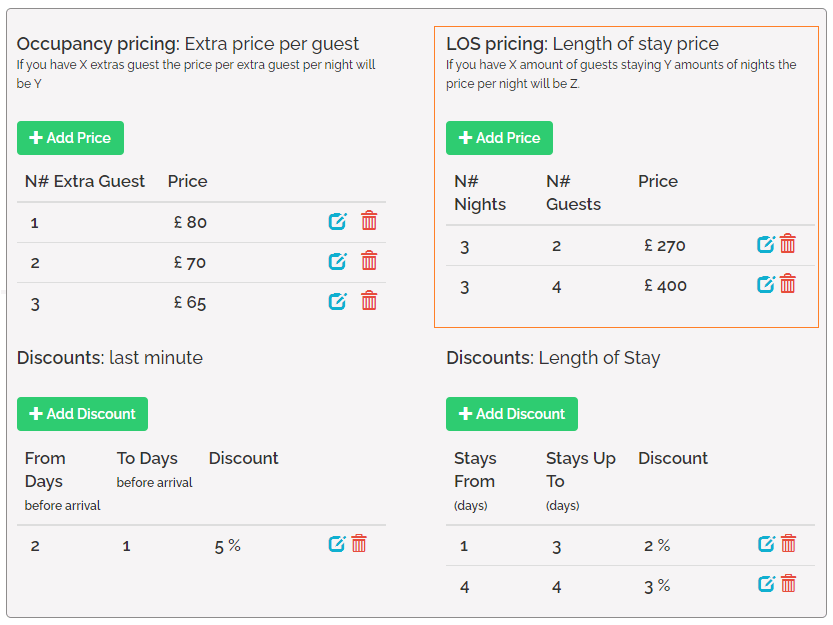
Booking.com supports LOS pricing. If you use LOS pricing model, it will be fully sent to Booking.com. Rentals United sends LOS pricing for max. 30 days and the guest will not be able to book a stay longer than that period.
FSP pricing model
Booking.com supports FSP pricing. If you use FSP pricing model, it will be fully sent to Booking.com. Rentals United sends FSP pricing for max. 30 days and the guest will not be able to book a stay longer than that period
Daily price model
Daily price
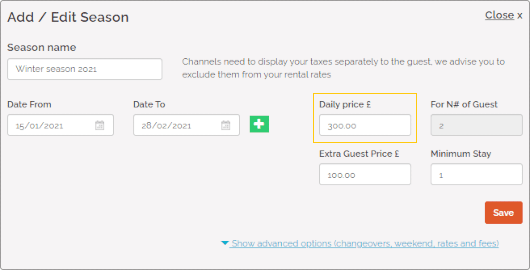
Daily price is the standard way of setting prices. It indicates the base price per night for the Standard number of guests.
- API endpoint: Pull_ListPropertyPrices_RS/Prices/Season/Price
Standard number of guests
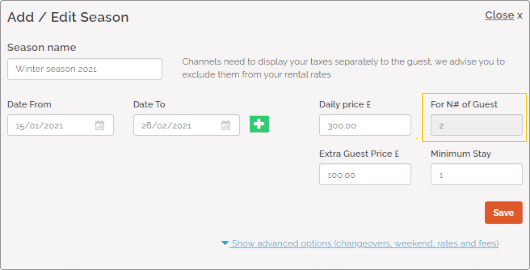
Standard number of guests refers to the maximum number of guests included in the daily price for whom the price does not change. If more guests than specified book a stay, the extra guests will be charged with the price set in the extra guest price element.
- API ednpoint: Pull_ListSpecProp_RS/Property/StandardGuests
Extra guest price 
Extra guest price is the price for guests that are not included in the Standard number of guests. In other words, if the overall number of guests exceeds the Standard number of guests, Extra guest price is applied for each guest above the specified standard.
- API endpoint: Pull_ListPropertyPrices_RS/Prices/Season/Extra
Once you configure extra guest price, you must refresh the synchronization settings for Booking.com. Our system updates information about the pricing model and ensures the prices sync correctly.
Example:
Provided you have the following settings:
- Maximum number of guests is 4,
- Standard number of guests is 2,
- Daily price is 200 $,
- Extra guest price is 110$.
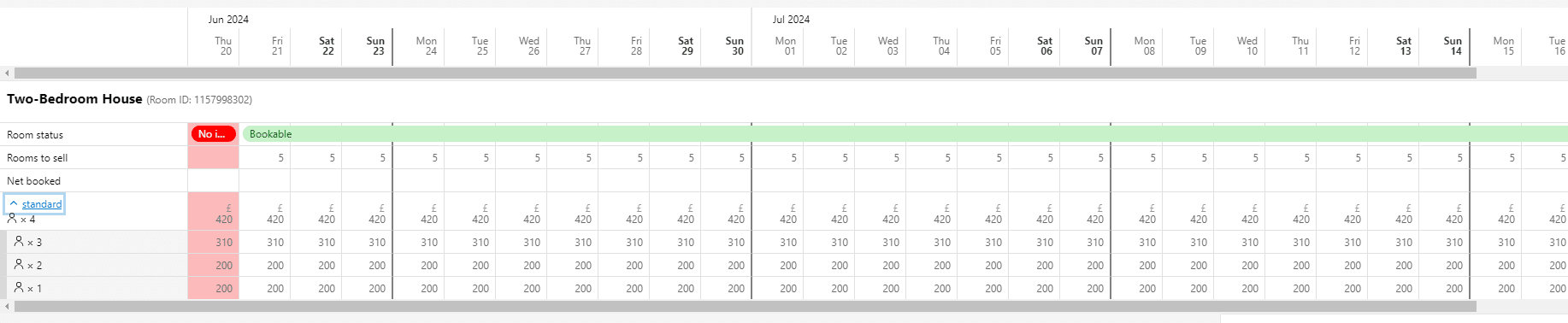
Then, Rentals United automatically creates 1 standard rate:
- for 2, where the price is 200 $;
- for 3, where the price is 310 $ (Daily price + 1 x Extra guest price);
- for 4, where the price is 420 $ (Daily price + 2 x Extra guest price).
This rate will look in the following way in Booking.com:
Minimum stay / Maximum stay
Minimum stay indicates the minimum number of days a reservation can be made for. Guests will be not be able to book your property if they want to book stays shorter than minim stay. This value is mandatory to provide.
Maximum stay is an additional setting (optional), which ensures that your guests will not be offered stays longer than a particular number of nights.
There are two types of stay restriction in Rentals United. The default stay restriction type is stay-through. You can choose which model you want to work on and your selection will apply to both minimum and maximum stay restrictions at the same time. If you want to change the stay restriction type, see here.
- Stay-through - the booking must meet the minimum / maximum stay requirements on each day of the booking
- Arrival-based - the booking must meet the minimum / maximum stay requirements on the arrival day only
Your listing in Booking.com will be available according to the selected minimum and maximum stay type.
Example: You have the stay-through stay restrictions:
- 11-05-2021 to 16-05-2021: MS is 5; MX is 7
- 17-05-2021 to 20-05-2021: MS is 7; MX is 7
Some of the stays:
- 5-night-long stay (11 - 16 May) is possible
- 5-night-long stay (13 - 18 May) is not possible (as the minimum stay on 18th May is 7)
- 6-night-long stay (11 - 17 May) is possible
- 7-night-long stay (11 - 18 May) is possible
- 8-night-long stay (11- 19 May) is not possible (as the maximum stay on 19th May is 7)
Example: You have the arrival-based stay restrictions:
- 11-05-2021 to 16-05-2021: MS is 5; MX is 7
- 17-05-2021 to 20-05-2021: MS is 7; MX is 7
Some of the stays:
- 5-night-long stay (11 - 16 May) is possible
- 5-night-long stay (13 - 18 May) is possible
- 6-night-long stay (11 - 17 May) is possible
- 7-night-long stay (11 - 18 May) is possible
- 8-night-long stay (11- 19 May) is not possible (as the maximum stay on 11th May is 7)

Weekend pricing
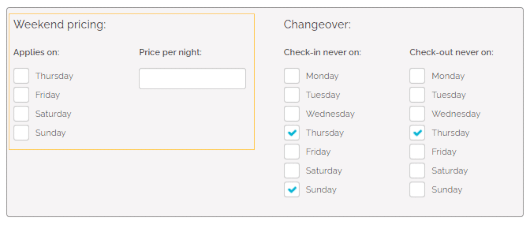
Weekend pricing refers to a specific type of pricing rules that are applied on selected weekend days only. If the weekend-specific pricing is set and the reservation matches specified criteria, then the Weekend pricing will be applied instead of the Daily price.
- API endpoint: Pull_ListPropertyPrices_RS/Prices/Season/Price
Occupancy pricing
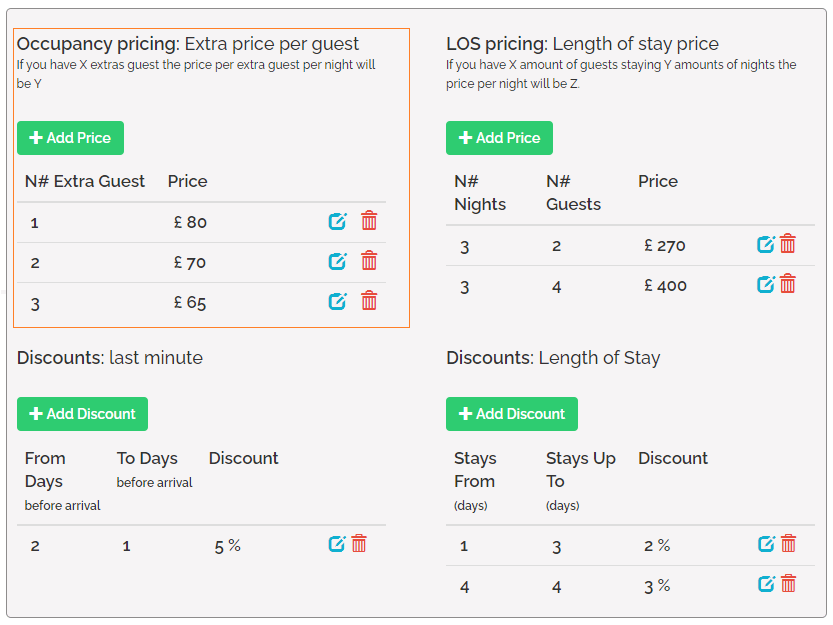
In Occupancy pricing, it is possible to specify pricing plans for different numbers of guests. The difference between Extra guest price and Occupancy pricing lies in fact that with Extra guest price the same price is applied for each extra guest. On the other hand, in Occupancy pricing it is perfectly possible to specify different prices for different numbers of guests. Note that Occupancy pricing takes precedence over Extra guest price.
- API ednpoint: Pull_ListPropertyPrices_RS/Prices/Season/EGPS
Once you configure occupancy pricing, you must refresh the synchronization settings for Booking.com. Our system updates information about the pricing model and ensures the prices sync correctly.
Complimentary topics
Discounts (N/A)
Calendar
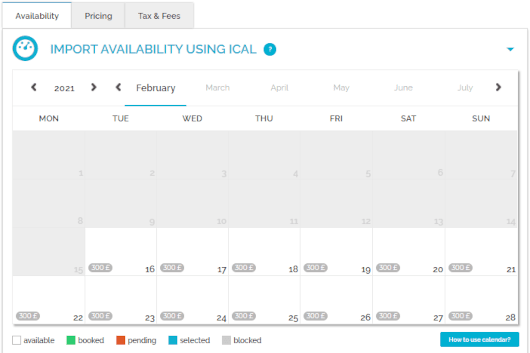
Calendar stands for the property's availability to rent. You can check here the availability of your property in the selected time frames. Once a reservation is inserted in Rentals United, the availability in the calendar gets blocked for this period. The calendar is updated automatically every time the availability of the property changes or at predefined times to remain up-to-date.
API endpoint:
Preparation Time Before Arrival
PTBA stands for Preparation Time Before Arrival. It is a general keyword to describe the minimum time a booking has to be made in advance in order to be accepted by the PM. The dates restricted by PTBA are normally set as not available already in the calendar. Hence, the PTBA data is already applied in availability and sent to the channel within the ARI data.
The PTBA in Rentals United blocks the availability x hours from 23:59 of the day of arrival on the property's local timezone. For example if the PTBA is set to 6 hours, bookings will be accepted until 18:00 of the day of arrival, after 18:00 the calendar will be closed. If the PTBA is set to 24 hours, bookings will be accepted until 23:59 before the day of arrival, after that the calendar will be closed.

Changeover restrictions
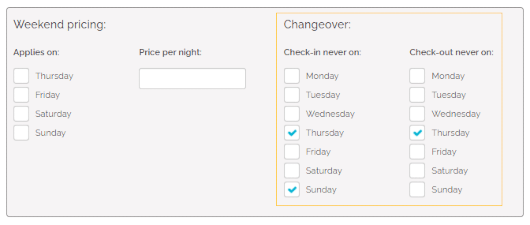
Changeover restrictions specify whether check-in or check-out is allowed for a given day. This is a great option if you need the guests checking in and out to fit your schedule and it will help you avoid unexpected guests. If some days are restricted from changeovers, then your guests will simply not be able to select such a stay if the start or end day falls on a changeover-restricted day.
- API endpoint: Pull_ListPropertyAvailabilityCalendar_RS
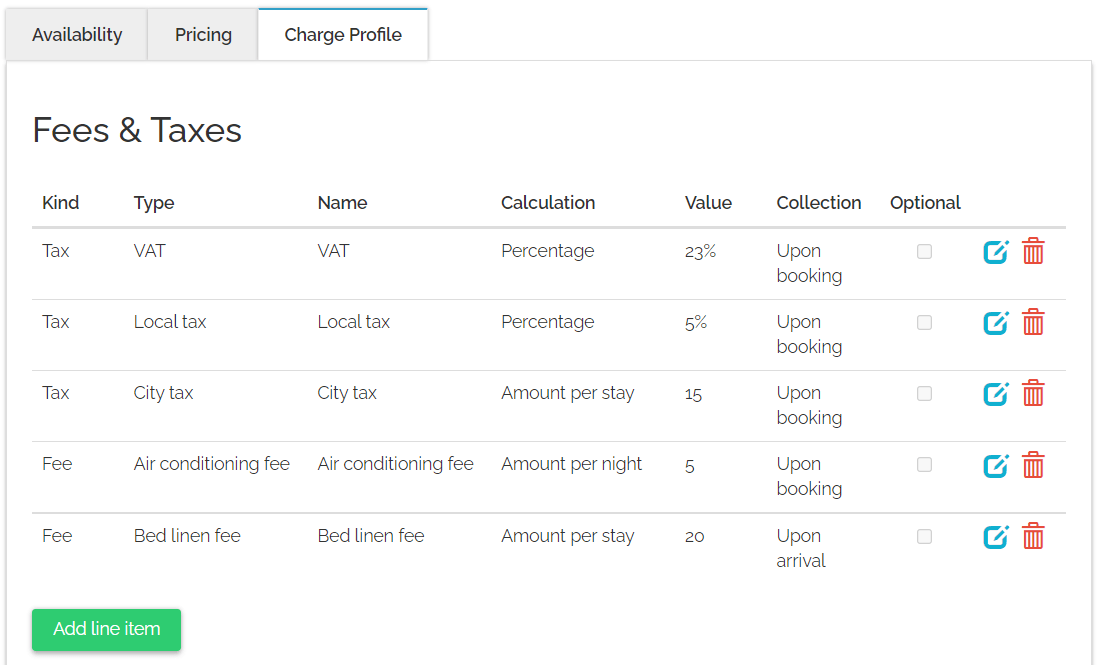
Fee refers to mandatory or optional charges paid in exchange for particular services. These include charges for additional services, for example Internet access or shuttle, or fees defined by local governments that do not fall into the tax category, for example environmental fees.
- API endpoint: Pull_ListSpecProp_RS/Property/AdditionalFees
Tax refers to mandatory charges legally levied on particular types of goods, services and transactions, paid as a contribution to the state’s revenue, for example VAT or city tax.
- API endpoint: Pull_ListSpecProp_RS/Property/AdditionalFees
The table below lists all the charges synced with Booking.com. Other charges are not shared with Booking.com.
| Rentals United ID | Rentals United name | Booking.com name | Booking.com ID |
|---|---|---|---|
| 0 | Unknown tax | TAX | Tax |
| 0 | Unknown fee | SERVICECHARGE | Service charge |
| 1 | Local tax | LOCALCOUNCILTAX | Local council tax |
| 2 | VAT | VAT | VAT |
| 3 | Tourist tax | GOVERNMENTTAX | Government tax |
| 4 | Goods and services tax | GOODSSERVICESTAX | Goods & services tax |
| 5 | City tax | CITYTAX | City tax |
| 6 | Towels fee | TOWELFEE | Towel charge |
| 7 | Electricity fee | ELECTRICITYFEE | Electricity fee |
| 8 | Bed linen fee | BEDLINEN | Bed linens fee |
| 9 | Gas fee | GASFEE | Gas fee |
| 10 | Oil fee | OILFEE | Oil fee |
| 11 | Wood fee | WOODFEE | Wood fee |
| 12 | Water usage fee | WATERFEE | Water usage fee |
| 13 | Transfer fee | TRANSFERFEE | Transfer fee |
| 14 | Linen package fee | LINENPACKAGEFEE | Linen package fee |
| 15 | Heating fee | HEATINGFEE | Heating fee |
| 16 | Air conditioning fee | AIRCONDITIONINGFEE | Air conditioning fee |
| 17 | Kitchen linen fee | KITCHENLINNENFEE | Kitchen linen fee |
| 18 | Housekeeping fee | HOUSEKEEPINGFEE | Housekeeping fee |
| 19 | Airport shuttle fee | AIRPORTSHUTTLEFEE | Airport shuttle fee |
| 20 | Shuttle boat fee | SHUTTLEBOATFEE | Shuttle boat fee |
| 21 | Sea plane fee | SEAPLANEFEE | Sea plane fee |
| 22 | Ski pass | SKIPASS | Ski pass |
| 23 | Wristband fee | WRISTBANDFEE | Wristband fee |
| 24 | Visa support fee | VISASUPPORTFEE | Visa support fee |
| 25 | Water park fee | WATERPARKFEE | Waterpark fee |
| 26 | Club card fee | CLUBCARDFEE | Loyalty card fee |
| 27 | Conservation fee | LOCALITYCONSERVATIONFEE | Conservation fee |
| 28 | Credit card fee | CREDITCARDFEE | Credit card fee |
| 29 | Pet fee | PETFEE | Pet fee |
| 30 | Internet fee | INTERNETFEE | Internet fee |
| 31 | Parking fee | PARKINGFEE | Parking fee |
| 32 | Insurance | INSURANCEFEE | Insurance fee |
| 33 | Service fee | SERVICECHARGE | Service charge |
| 34 | Resort fee | RESORTFEE | Resort fee |
| 35 | Booking fee | SERVICECHARGE | Service charge |
| 36 | Tourism fee | TOURISMFEE | Tourism fee |
| 37 | Destination fee | DESTINATIONCHARGE | Destination charge |
| 38 | Extra bed fee | EXTRA_BED_FOR_ADULT | Extra bed for adult |
| 39 | Environment fee | ENVIRONMENTFEE | Environment fee |
| 40 | Children extra fee | SERVICECHARGE | Service charge |
| 41 | Cleaning fee | CLEANINGFEE | Cleaning fee |
| 42 | Book Direct service fee | SERVICECHARGE | Service charge |
| 43 | Airbnb short term cleaning fee | SERVICECHARGE | Service charge |
Calculation types
The table below lists all the calculation types synced with Booking.com. Other charges are not shared with Booking.com.
| RU ID | RU calculation type | Booking.com discriminator |
|---|---|---|
| 1 | Amount per stay | PER_STAY |
| 2 | Amount per night | PER_NIGHT |
| 3 | Percentage | PERCENTAGE |
| 4 | CumulativePercentage | PERCENTAGE |
| 5 | Amount per person & stay | PER_PERSON_PER_STAY |
| 6 | Amount per person & night | PER_PERSON_PER_NIGHT |
| 13 | Percentage per day | PERCENTAGE |
| 14 | Percentage per person | PERCENTAGE |
If multiple charges are mapped to the same charge name in Booking.com, we only use one fee calculation type in most cases. The calculation type we choose is selected according to the order:
- Amount per stay
- Percentage
- Amount per night
- Amount per person & stay
- Amount per person & night
Collection times
All charges are shared with Booking.com regardless of their collection time settings and all charges are treated as "Collected upon booking".
Optional charges
Charges labelled as 'Optional' are not sent to the channel. The only exception is the ‘Pet fee’ and ‘Extra bed’ fee.
Pet fee
Pet fee is always shared with Booking.com regardless of its setting (optional/not optional). Booking.com will collect the pet fee for each pet and each night in the reservation.
Extra bed fee
Extra bed fee is shared with Booking.com only if set to specific calculation types. Booking.com will apply the ‘Extra bed’ fee according to the mappings in the below table. If the ‘Extra bed’ fee is set to a different calculation type, the charge will not be sent to Booking.com.
| RU ID | RU calculation type | Booking.com discriminator |
|---|---|---|
| 1 | Amount per stay | PER_STAY |
| 2 | Amount per night | PER_NIGHT |
| 5 | Amount per person & stay | PER_STAY |
| 6 | Amount per person & night | PER_NIGHT |
Priority of charges
The room-level fees have priority over the hotel-level fees. It means that if the same fee is defined at both the room and hotel level, then only the room-level fee will take effect when the respective room is booked.
VAT amount
Do not set the VAT amount to 0% as Booking.com doesn't accept this configuration.
For properties located in European Union, Rentals United automatically adds a VAT amount to the tax configuration when a property lacks a configured VAT amount. This process protects property managers from VAT losses.
Additionally, Booking.com applies local VAT automatically if properties in Rentals United don't have VAT configured in some regions. For details, reach out directly to Booking.com support.
Charges without values
Charges with the ‘0’ value are not shared with Booking.com.
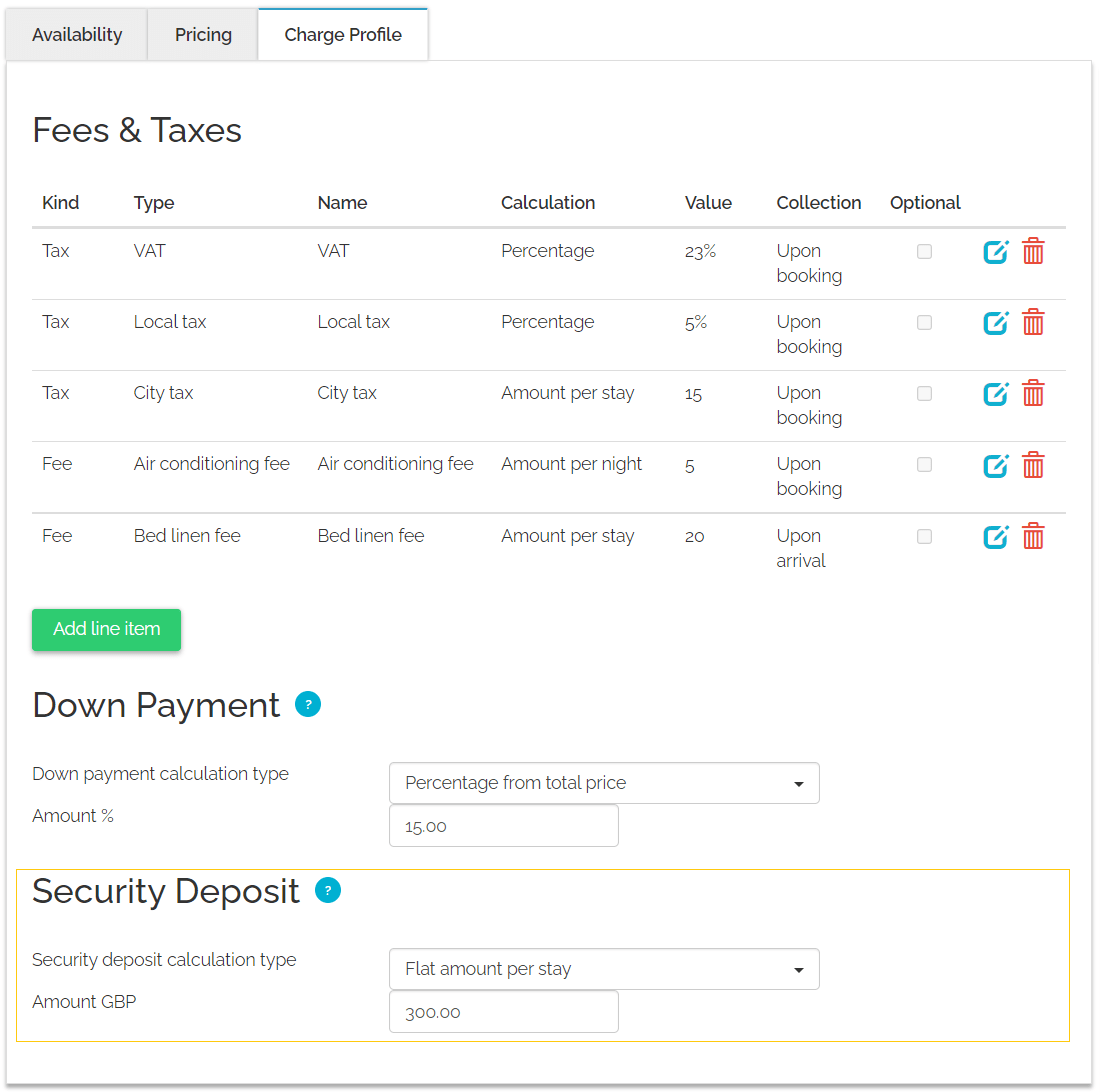
Down payment (N/A)
Security deposit
Security deposit is a mandatory or optional refundable charge the guest needs to pay to cover for potential property damages.
- API endpoint: Pull_ListSpecProp_RS/Property/SecurityDeposit
To sync security deposit amount with Booking.com, choose the "Flat amount per stay" option.
To charge security deposit by credit card, your property must be verified by Booking.com. Otherwise, you can charge security deposit in cash (after the guest arrival).
Currency
Currency in Rentals United is a fixed value, by default established on the basis of the property location. The currency of any property can be checked in Rentals United, go to Step 5: Price and availability after selecting All properties tab.
- API endpoint: Pull_ListSpecProp_RS/Property@Currency
Booking.com requires you to use particular currencies, depending on the location of your property. When Rentals United pushes new properties to Booking.com, it will automatically assign the local currency according to Booking.com logic. It is very important while mapping the properties to the existing listings in Booking.com, as correct currency needs to be selected.
In case the currency of your property does not match the one in Booking.com, Rentals United will convert the pricing upon each price sync.
When a booking is inserted to Rentals United, the price will be converted, too. The original booking price will be displayed in the reservation comments. You can access it after selecting a particular reservation available in the Bookings or Guest Planner tabs.
