Despegar doesn't support LOS pricing in full. Rentals United designed a dedicated solution that will allow you to use some features of LOS pricing.
Step by step:
In Rentals United platform, open Channel Settings. Follow the steps here.
- Open the Use basic LOS pricing section.
-
Select one of the available options: "LOS price based on minimum stay" or "LOS price as your default price".
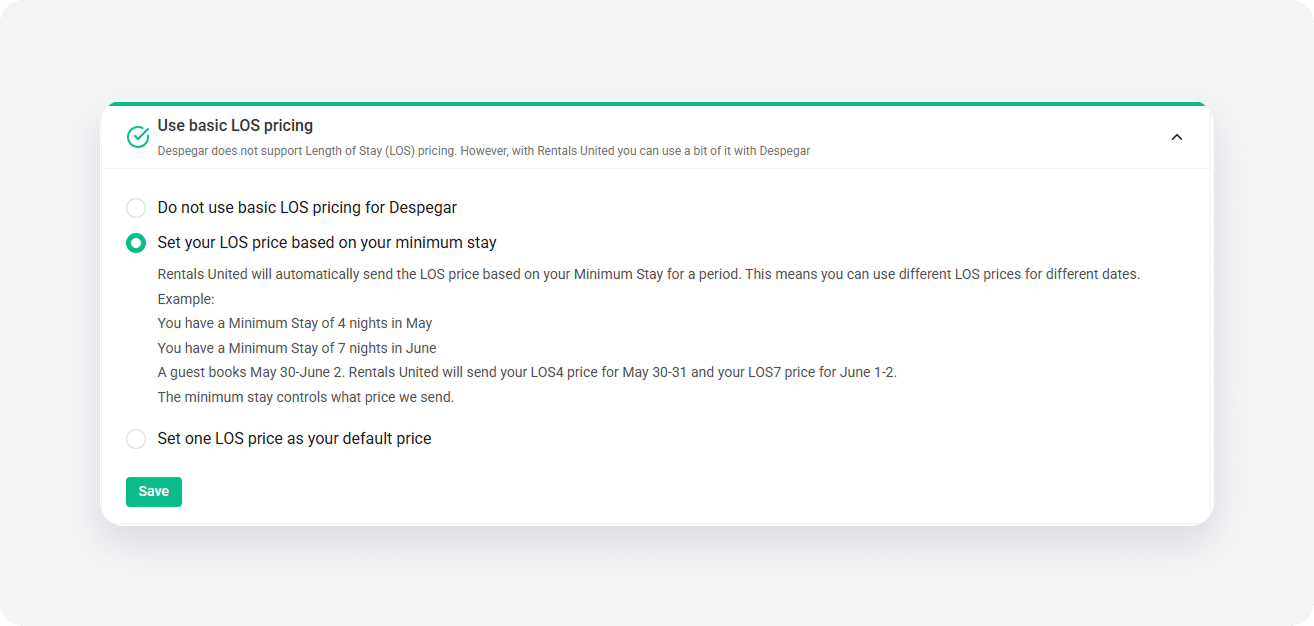
- Save your changes.
Default settings
By default, Basic LOS pricing is turned off, which means Rentals United only syncs your daily prices to Despegar.
Turn on Basic LOS pricing
If you decide to turn Basic LOS pricing on, ensure that you have LOS prices provided in Step 5: Price and availability. If you don't provide any LOS prices, the system syncs your daily prices despite enabling basic LOS pricing.
LOS price based on your minimum stay
To ensure accurate pricing calculations across different reservation dates, Rentals United automatically sends the LOS price based on the minimum stay configuration for a specific period. This automatic synchronization allows the use of unique LOS prices for varying dates.
For example, your settings in Step 5: Price and availability are the following.
- MS in May is set to 5
- MS in June is set to 3
- LOS pricing in May and June:
- 1-night LOS price is 150 per night
- 2-night LOS price is 140 per night
- 3-night LOS price is 140 per night
- 4-night LOS price is 110 per night
- 5-night LOS price is 100
A reservation: 28th May to 1st June
The reservation doesn't meet the minimum stay requirement in May = 5 nights (28th May to 1st June, 4 nights in total). Such a reservation can't be made just because the minimum stay requirement violation.
A reservation: 1st June to 6th June
This reservation meets the minimum stay requirement in June = 3 nights (1st June to 6th June, 5 nights in total). Even though a 5-night LOS price is available, Rentals United sends the price based on the minimum stay. Since minimum stay in June is 3, the system sends the price for 3-night stay, that is 140 per night.
A reservation: 28th May to 6th June
This time, the reservation fulfills the minimum stay requirement in May = 5 nights (28th May to 6th June, 9 nights in total) even though it has only 4 nights in May. This is because minimum stay is checked for each day of the reservation, and on the 31st May there are still 6 nights left.
However, if the minimum stay in June was 10 nights, the reservation would be rejected because the overall reservation length in May and June is 9 nights.
LOS price as your default price
In this configuration, provide a LOS price that will be the default rate for all calendar dates. The minimum stay automatically changes to match the chosen LOS number, unless specific calendar dates require a higher minimum stay.
For example, after selecting a "LOS4" option form the dropdown, the system uses your LOS4 price as the nightly default price for all dates. Your minimum stay increases to 4 nights for all seasons (except where minimum stay is higher).
For example, your settings in Step 5: Price and availability are the following.
- MS in May is set to 5
- MS in June is set to 3
- LOS pricing in May and June is:
- 1-night LOS price is 150 per night
- 2-night LOS price is 140 per night
- 3-night LOS price is 140 per night
- 4-night LOS price is 110 per night
- 5-night LOS price is 100 per night
- The default price in Basic LOS pricing tab is LOS4.
A reservation: 27th May to 1st June
The reservation meets the minimum stay requirement in May = 5 nights (27th May to 1st June, exactly 5 nights in total). However, you set the Basic LOS pricing to use a 4-night LOS price and, therefore, the reservation in May costs 110 per night. There will be no additional charge for the extra 5th night of the stay, even though a 5-night LOS price was defined.
A reservation: 1st June to 4th June
It may look like the reservation meets the minimum stay requirement in June = 3 nights (1st June to 4th June, exactly 3 nights in total). However, it doesn't. According to the Basic LOS pricing tab, you selected LOS4. This means that if your minimum stay is below the LOS value, the system increases it. The minimum stay in fact is 4 nights, not 3 nights. This eliminates the risk of renting a property below a certain level. In this case, it will not be possible to accept this reservation.
A reservation: 27th May to 4th June
This time, the reservation meets the minimum stay requirement in in May = 5 nights (27th May to 1st June, exactly 5 nights in total) and June = 3 nights (1st June to 4th June, exactly 3 nights in total) although the LOS4 setting forces the lower minimum stay to be increased 4 nights. This is because minimum stay is checked for each day of the reservation, and on the 4th June there are already 8 nights passed. Nonetheless, the price for this stay is indicated by the LOS4 setting and is 110 per night.