Payment methods (N/A)
Cancellation Policy
Cancellation Policy (CP) describes the charges applied if a reservation is cancelled within a specific period of time.
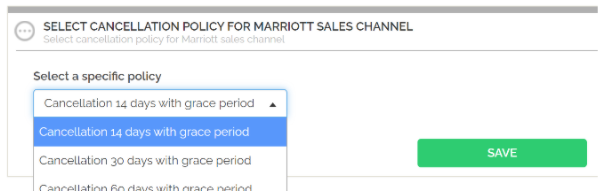
You are allowed to choose one of the general CPs predefined for Homes & Villas by Marriott Bonvoy in the Channel Settings. There are five policies to choose from:
- Cancellation 14 days with grace period,
- Cancellation 30 days with grace period,
- Cancellation 60 days with grace period,
- Cancellation 90 days with grace period,
- Auto-select.
If the Auto-select option is chosen in the Services tab, Rentals United considers the Cancellation Policy set on the property level and checks it against the above four Cancellation Policy options available for the Homes & Villas by Marriott Bonvoy. Once all the possibilities are analyzed, the best matching Cancellation Policy is automatically selected.
In order to learn the details on the above policies, please visit the Homes & Villas by Marriott Bonvoy FAQ website.
- In Rentals United platform, open Channel Settings. Follow the steps here.
- A list of available custom policies opens.
-
Unfold the Cancellation Policy section. Select one of the CPs available in the dropdown list.
- Click Save.