Promotions on Vrbo help your property stand out and attract the right guests at the right moment. They give you more control over visibility, targeting, and demand across different seasons.
- Increased visibility in search results with a special badge for discounts of 5% or more.
- Better targeting and higher-value bookings by focusing on specific guest groups, including high-spending members.
- Flexible demand-building tools that let you adjust strategies anytime, from early-booking offers to mobile-only or length-of-stay promotions.
With Rentals United, you can manage all your Vrbo promotions in one place, in bulk, with just a few clicks, saving time, reducing mistakes, and optimizing performance across every listing without ever logging into Vrbo.
Vrbo promotion types
| Early-bird | Last-minute | Mobile-only | Member-only |
|---|---|---|---|
| Secure steady bookings by offering discounts to guests who book in advance | Maximise peak-season revenue by attracting price-savvy guests | Reach more travellers and boost traffic with mobile-only discounts | Attract trusted, high-value travellers with member-only discounts. |
| Example promo: 10% for bookings made 2 months and more before the check-in | Example promo: 10% for bookings made 3 days and less before the check-in | Example promo: 10% for bookings made on mobile device |
Example promo: Blue: 10% Silver: 15% Gold: 20%
Note: Gold member discounts are also displayed to platinum members. |
| Best for: Securing future occupancy and improving forecastability. | Best for: Filling gaps and reducing unbooked nights at the last minute. | Best for: Capture predictable demand from desirable guests by increasing your mobile visibility. | Best for: Attracting valuable guests who book earlier, stay longer, and spend more than non-members. |
Promotion details
Internal name - Name to differentiate the discount from other discounts of the same type.
Application rules - Depending on the selected type, your promotion will apply differently. Set the promotion type and achieve different results. See more here.
-
Single promotion - Apply one discount for the entire stay.
Example: Apply 10% discount for the entire stay.
-
Day-of-week promotion - Set a different discount for each day of the week.
Example: Monday - Wednesday: 10% off to fill occupancy in the weekdays
Friday - Sunday: 5% off to appear higher in the search results
-
Multi-night promotion - Apply a discount to a specific night in the stay.
Example: Offer 50% off on the 3rd night and attract longer bookings.
You can additionally make it recurring to apply to each 3rd night in the reservation.
Discount - The discount amount, for example 10%.
Days before arrival - Booking time condition to become eligible for the discount.
- Early-bird: Set it from 60 to 500 to target early travellers booking in advance.
- Last-minute: Set it from 2 to 30 to target last-minute guests and fill in the occupancy gaps.
Available to travel - It indicates the time range when the promotion becomes available based on the arrival and departure dates. Max. promotion length is 2 years. Use it to boost the performance in a low season. For example, this promotion can be offered only for guests staying between 1 October and 31 November. If they stay at a different time, the promo will not apply.
- Evergreen promotions - You can set up evergreen promotions which is a promotion with no end date. In order to do it, skip the travel end date.
Excluded dates - It indicates the dates excluded from the promotion, such as a local event or high season. Use it to stop offering discounts on dates when you expect high occupancy.
Length of stay - Minimum number of nights in the booking to be eligible for the discount. For example, set it to 7 to offer a weekly discount. If you leave this field blank, the promotion applies for all bookings lasting from 1 to 180 nights.
Membership setup - Define the discount per membership level.
- Blue - from 10% to 75%.
- Silver - from 11% to 75%.
- Gold - from 12% to 75%.
The higher the membership level, the higher the discount must be. Additionally, Vrbo has restrictions to the membership level configuration.
-
Accepted configurations:
- Blue,
- Blue and Silver,
- Blue, Silver and Gold,
- Blue and Gold.
-
Not accepted configurations:
- Silver,
- Silver and Gold,
- Gold
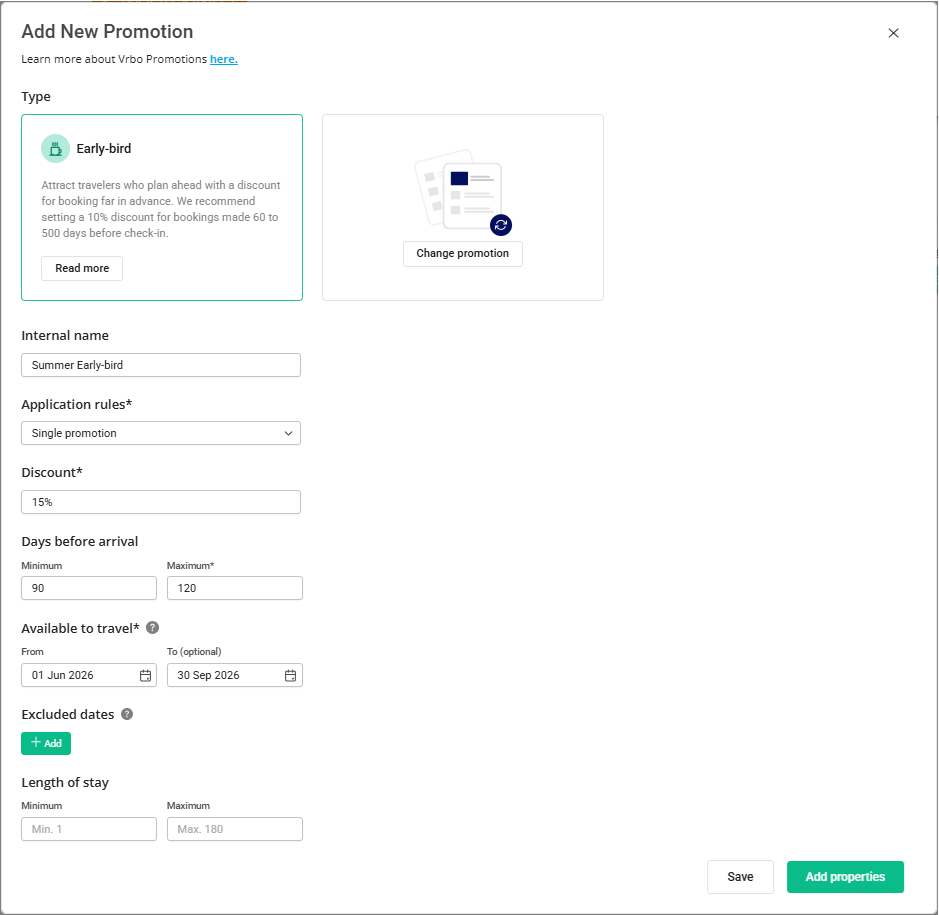
Example: The picture below shows you an early-bird promotion of 15% for guest booking 3 - 4 months in advance of the check-in. The promotion applies only in the high season (from 1 June to 30 September).
Restrictions
Mobile and member-only promotions apply to every night of the booking.
Early-booking and last-minute promotions apply only to the nights that fall within the promotion window you set (days before arrival). This means the discount may apply to only part of the stay, not the entire booking.
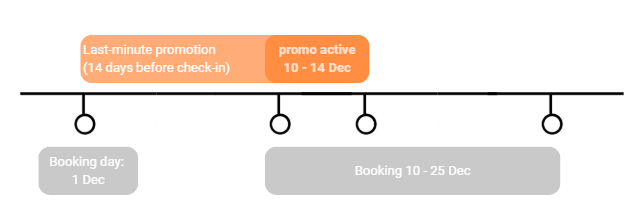
Example: You set a last minute promotion for stays booked within 14 days of the check-in date. If a guest books on December 1 a stay that spans December 10 - December 25, the discount will only apply to the first 4 days of the booking.
Guest view
Vrbo offers several merchandising features to boost your visibility among guests, including:
- Badges that highlight discounted listings
- Price strikethroughs that show the original price
- Discount labels on search results, property pages, and checkout
- Search filters that let guests find discounted properties easily
The table below summarizes the discount required to unlock each merchandising feature.
| Promotion type | Strikethrough * | Badging and strikethrough * | Recommended discount * |
|---|---|---|---|
| Early-bird | 1% | 5% | 10% |
| Last-minute | 1% | 5% | 10% |
| Mobile-only | 1% | 5% | 10% |
| Member-only |
Blue: 10% Silver: 11% Gold: 12% |
Blue: 10% Silver: 15% Gold: 20% |
Blue: 10% Silver: 15% Gold: 20% |
* Data source: Vrbo Help Centre
Promotions display
If multiple promotions are applied to a property at the same time, the merchandising features are prioritized in the following order:
- New listing discounts (set it in Vrbo)
- Early-booking or last-minute promotions
- Member-only promotions
- Mobile-only promotions
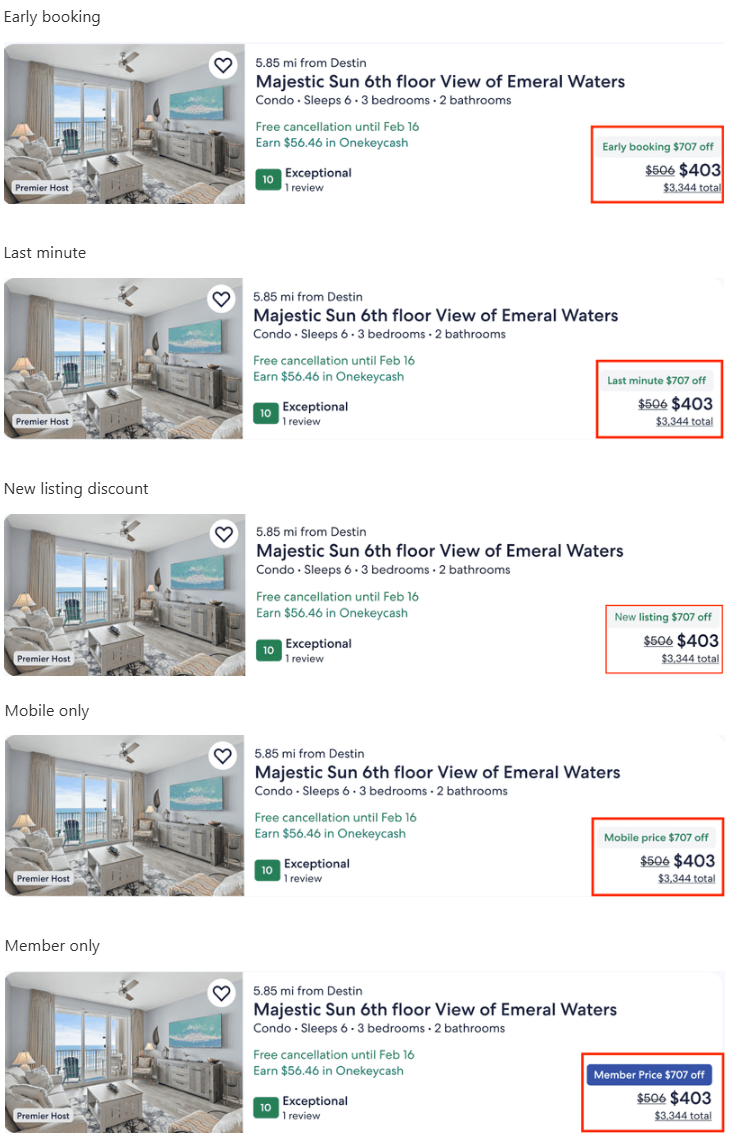
Promotions preview
Below you can preview how your promotions will be visible to the guests.
Stacking and priority rules
Promotion - promotion stacking
Promotions do not stack with other promotions. It means you can create multiple promotions for your listing, but Vrbo will only apply one at a time - the one that is the most beneficial for the guest.
Example: You create two promotions: a 10% Member-only promotion and a 15% Last-minute promotion. If a guest qualifies for both, Vrbo will only apply the 15% Last-minute promotion because it gives the guest the bigger discount.
Promotion - seasonal discount stacking
At the same time, promotions stack with seasonal discounts (such as weekly or monthly - see here). Vrbo will apply all of them, according to a specific order. Note that this may result in a double discount or a higher discount than expected.
Check below the order of applying discounts:
- Seasonal discounts
- Promotions
Example: Your base rate is $100. You have one seasonal (weekly) discount of 15% and one member-only promotion of 10%. Vrbo first applies the seasonal discount, reducing the price to $85. Then the promotion is applied to the discounted rate, resulting in a final price of $76.50.
Example: If a booking qualifies for multiple seasonal discounts (e.g. 5% and 10%), then the discount value is combined. If your base rent is $100, Vrbo applies the combined 15% discount, reducing the price to $85. This case does not apply to promotions, but only the seasonal discounts.
Practical use: Promo stacking and priorities
Example: I have both seasonal discounts and promotions. How will discounts apply?
- Base rate: $100
- Seasonal discounts:
- Seasonal Last-minute discount: 3%
- Season: from 1 October to 14 October
- Promotions:
- Last-minute: 10%
Discounted rate - only one discount applies per night
There is a booking from 27 September until 3 October. Seasonal discounts normally have higher priority than promotions. However, since the seasonal last-minute discount only covers part of the stay, the last-minute promotion is applied to the remaining nights that fall outside the seasonal period.
- Discounted rate (27 - 30 Sep): $100 - 10% (Last-minute promotion) = $90
- Discounted rate (1 - 3 Sep): $100 - 3% (seasonal Last-minute discount) = $97
Total booking amount: 3 x $90 + 3 x $97 = $561
Final outcome: Discounts do not stack, but apply according to the priorities.
Supported promotion types
| Vrbo promotion / discount | Available in Rentals United | Where to set |
|---|---|---|
| Promotions (Early-booking, Last-minute, Mobile-only and Member-only) | ✅ | Property Settings > Promotions |
| New listing discount promotions | ❌ | Set in Vrbo, see here |
| Lodging discounts | ✅ | Edit property > Step 5: Price and availability > Discounts |