In Rentals United, you can choose how the system calculates available units in multi-unit groups. You can either maximize the occupancy by allowing guest moves or prioritize guest experience by preventing them.
Understand multi-unit groups
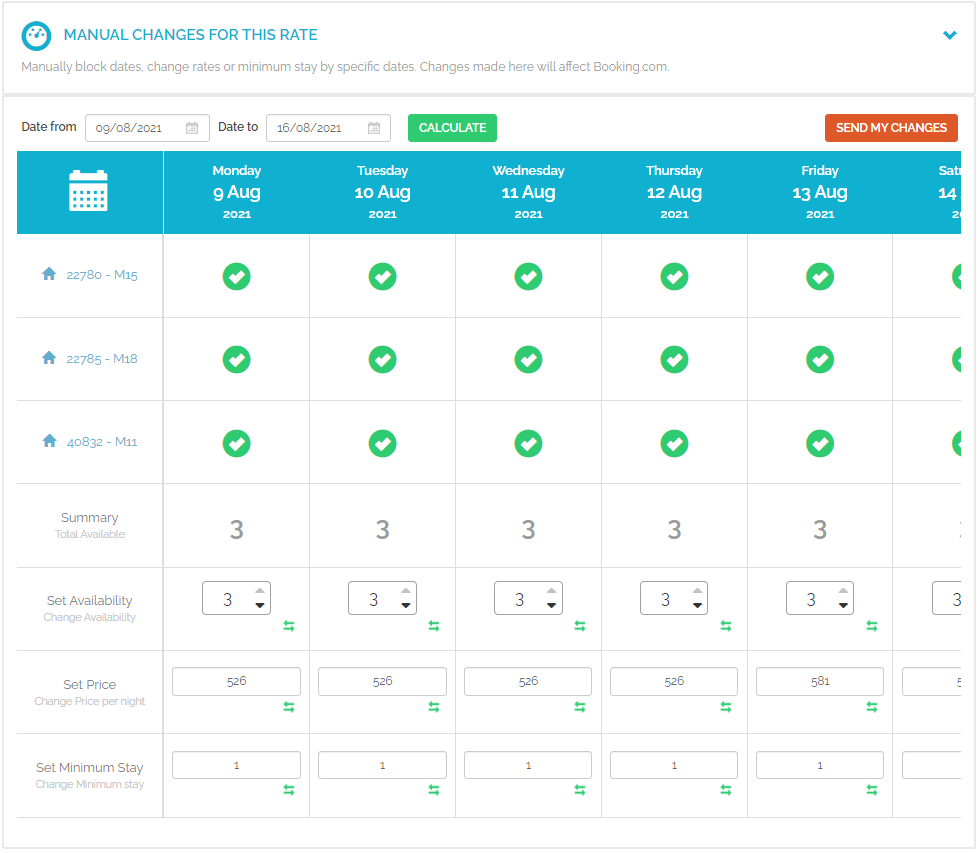
In a multi-unit group, Rentals United combines the availability of similar properties - like several two-bedroom apartments - into a single pool. This information is then sent to your connected channels as a total number of "units to sell."
Choose your availability strategy
You can choose between two main strategies for your Rentals United account: enabling moves or disabling moves.
Enable moves
When moves are enabled, Rentals United sends the total sum of all available properties within a group to your channels. This strategy helps you accept the maximum number of guests possible, even if no single property is vacant for the guest's entire stay. This is the default setting for all accounts.
If you use this setting, keep the following in mind:
Full-stay priority: The system first attempts to place bookings in properties available for the entire stay.
Split bookings: The system accepts a booking even if it requires moving the guest between different units within the group.
Manual management: You must manually assign the guest to specific properties to "play Tetris" with your calendar and minimize the impact on the guest.
Overbooking labels: If a booking is split across units, the reservation may appear in Rentals United account with an "overbooking" label, even if you have enough total physical space to accommodate them
When moves are enabled, it means the Rentals United moves algorithm is turned off.
Disable moves
When moves are disabled, guests stay in the same unit for their entire trip. This is the recommended option.
Disabling moves requires turning on the moves algorithm. The algorithm limits the availability sent to channels to only include units that can accommodate a guest for their full stay. In this configuration, you don't need to move your guests.
Key features of the algorithm:
Prevents guest moves: Bookings are only accepted if a single unit is vacant for the duration of the reservation.
Dynamic updates: The total availability field may show fewer units than your total physical inventory to prevent split stays.
Real-time recalculation: The algorithm recalculates availability every time a reservation or cancellation occurs. This often "unlocks" dates that were previously hidden to optimize the calendar.
Group inheritance: When you enable the algorithm for a multi-unit group, any new properties added to that group automatically inherit the setting.
Guest moves
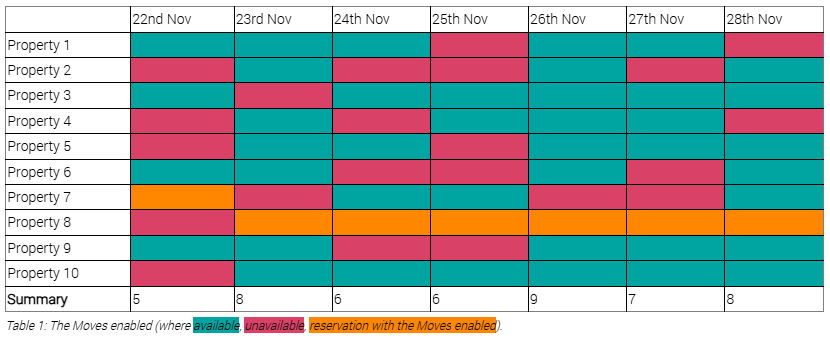
The below table shows the multi-unit group availability. When moves are enabled, the system sends the current availability to the channel and accepts bookings "split" between units. You must manually assign the unit when the guest checks in to ensure they don't need to move between rooms during their stay.
You can allow for a few 7-night bookings stays when moves are enabled:
- Move the 1-night booking on 23rd November at Property 3 to release its availability and accommodate a booking from 22nd November to 28th November
- Move the 1-night booking on 22nd November at Property 10
- Move the 2-night booking on 24th - 25th November at Property 9
- Move the 1 night booking on 22nd November at Property 8
Note: If moves are disabled, the system limits the availability shared with the channel to avoid moves. With moves disabled, it's not possible to accommodate a 7-night booking at any of the units. The longest possible booking is 6-night booking on 23rd November at Property 8 or Property 10.
Changing your settings
New multi-unit groups use the default "moves enabled" setting. You can request to disable moves for your entire Rentals United account so all future groups inherit the "moves disabled" setting. To change your settings, contact the Support Team.