Setting a minimum stay requirement allows you to establish a floor for all your properties connected to Airbnb. When you define this value in your channel settings, any property with a lower minimum stay automatically updates to match this new requirement. Properties that already have a higher minimum stay remain unchanged.
This feature is particularly useful during high-demand periods, such as local concerts or sporting events. It helps you maximize revenue by ensuring longer bookings and can assist in vetting guests during busy seasons.
For example, if you set the minimum stay to 3:
Property A (Minimum stay of 2) updates to 3.
Property B (Minimum stay of 3) stays at 3.
Property C (Minimum stay of 4) stays at 4.
Step by step:
- In Rentals United account, open Channel Settings. Follow the steps here.
Locate the Airbnb minimum stay section and click the Down arrow to expand it.
Select the Increase the minimum stay... option.
Enter the number of nights for the new minimum stay requirement.
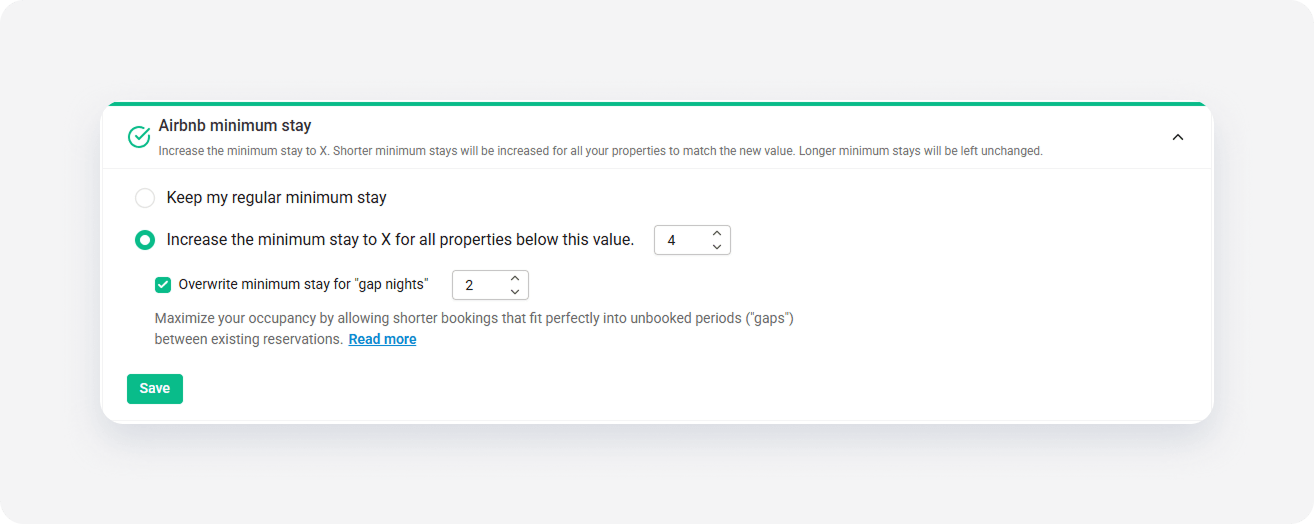
Click Save.