This article explains how to create, edit and remove Airbnb and Vrbo promotions in Rentals United.
Create new
- In your Rentals United account, open Property Settings. Follow the steps here.
- Switch to the Promotions tab.
-
Click + Add new.
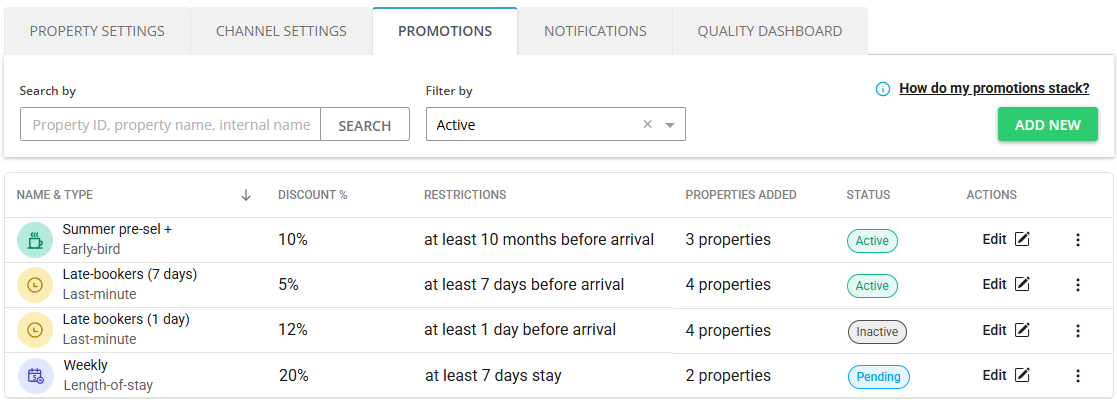
- Choose the type of promotion to create and click Next.
- Provide the discount details.
- Click Add properties to assign this promotion to properties. You can select multiple properties at once.
- Click Save & Activate.
The discount enters the  state and is being processed by the channel. You cannot edit it or delete it at the moment. We will inform you after the discount is successfully created in the channel in an email notification. You will also be informed about any errors that prevented creation of this discount for some properties.
Edit discount
You can edit the discount details such as the discount amount and its conditions.
- In your Rentals United account, open Property Settings. Follow the steps here.
-
Click on the Edit button next to the discount you want to edit.
- Edit the discount details.
- Click Save changes.
Edit and delete properties
You can edit the properties which the discount is valid for. This way you can exclude high-performing properties where stays do not need to be discounted and secure your revenue.
- In your Rentals United account, open Property Settings. Follow the steps here.
- Click on the Edit button next to the discount you want to edit.
- Scroll down to the list of properties.
- Click + Add to assign this discount to a new property.
-
Click the Trash icon to remove the discount from a property.
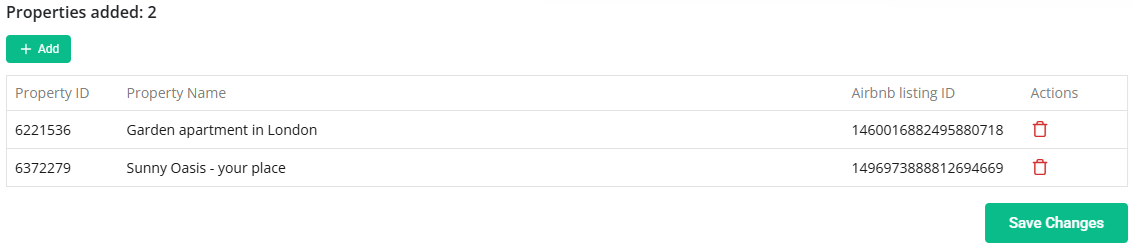
- Click Save changes.
Activate and deactivate discount
You can temporarily deactivate the discount and activate it back.
- In your Rentals United account, open Property Settings. Follow the steps here.
- Click on the Status icon and change the status. For example, click on the Inactive status and select the Activate option from the menu.
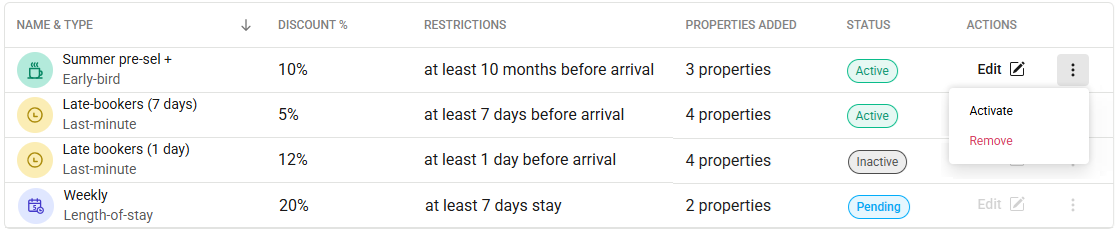
- Click Save changes.
Remove discount
You can remove the discount entirely.
- In your Rentals United account, open Property Settings. Follow the steps here.
- Click on the Status icon and change the status. For example, click on the Inactive status and select the Delete option from the menu.
- Click Save changes.