You can manage reservation charges and refunds via API methods. Access to payment API methods is restricted and must be enabled before use. To enable access, contact the Support Team.
Charge reservation
Use the Push_PutReservationCharge_RQ method to charge a guest's tokenized card. Credit card tokenization occurs automatically during the reservation creation process in Rentals United.
Request:
| XML Path | Data Type | Type | Description |
|---|---|---|---|
| Push_PutReservationCharge_RQ | C | Root element | |
| Push_PutReservationCharge_RQ/Authentication | C, M | Authentication details | |
| Push_PutReservationCharge_RQ/Authentication/AccessKey | String | M | Access key |
| Push_PutReservationCharge_RQ/Authentication/SecretKey | String | M | Secret key |
| Push_PutReservationCharge_RQ/ReservationID | Integer | M | The unique RU identifier of the reservation |
| Push_PutReservationCharge_RQ/Amount | Decimal | O* | The specific amount to charge |
| Push_PutReservationCharge_RQ/PercentageAmount | Decimal | O* | Percentage of the total reservation value (0.00 to 100.00) |
Note: Provide either Amount or PercentageAmount. Do not provide both in a single request.
<Push_PutReservationCharge_RQ>
    <Authentication>
        <AccessKey>[AccessKey]</AccessKey>
        <SecretKey>[SecretKey]</SecretKey>
    </Authentication>
    <ReservationID>123456</ReservationID>
    <Amount>10.29</Amount>
</Push_PutReservationCharge_RQ>
Response:
| XML Path | Data Type | Type | Description |
|---|---|---|---|
| Push_PutReservationCharge_RS | C | Root element | |
| Push_PutReservationCharge_RS/Status | String | M | Result of the operation |
| Push_PutReservationCharge_RS/Status/@ID | Integer | M | Status ID |
| Push_PutReservationCharge_RS/ResponseID | String | M | Unique ID of the response |
| Push_PutReservationCharge_RS/TransactionID | String | M | Stripe Transaction or PaymentIntent ID |
| Push_PutReservationCharge_RS/AmountProcessed | Decimal | O | Amount to be charged in this transaction. |
| Push_PutReservationCharge_RS/RemainingBalance | Decimal | O | Remaining outstanding balance for the reservation |
| Push_PutReservationCharge_RS/PaymentAuthenticationUrl | String | O | URL for 3DS verification (if Status ID="403") |
| Push_PutReservationCharge_RS/Note | String | O | Additional information or error details |
Success response (immediate charge):
<Push_PutReservationCharge_RS>
    <Status ID="0">Success</Status>
    <ResponseID>0855309b8c4544989c2739e5bf78156a</ResponseID>
    <TransactionID>ch_6T3rtiOGXrchHklk0ANtmL8n</TransactionID>
    <AmountProcessed>60.00</AmountProcessed>
    <RemainingBalance>40.00</RemainingBalance>
</Push_PutReservationCharge_RS>
Pending Authentication (3DS Required):
Stripe may challenge the transaction for additional authorization. This occurs when the cardholder's bank requires 3D Secure (3DS) verification to authorize the transaction.
If Stripe returns an authentication_required challenge, the response includes a PaymentAuthenticationUrl hosted under the Rentals United domain. Redirect the guest to this URL to complete 3DS verification.
<Push_PutReservationCharge_RS>
    <Status>Pending Authentication</Status>
    <TransactionID>pi_6T3rtiOGXrchHklk0ANtmL8n</TransactionID>
    <PaymentAuthenticationUrl>https://rentalsunited.com/verify/unique_token</PaymentAuthenticationUrl>
    <Note>User must complete 3DS verification</Note>
</Push_PutReservationCharge_RS>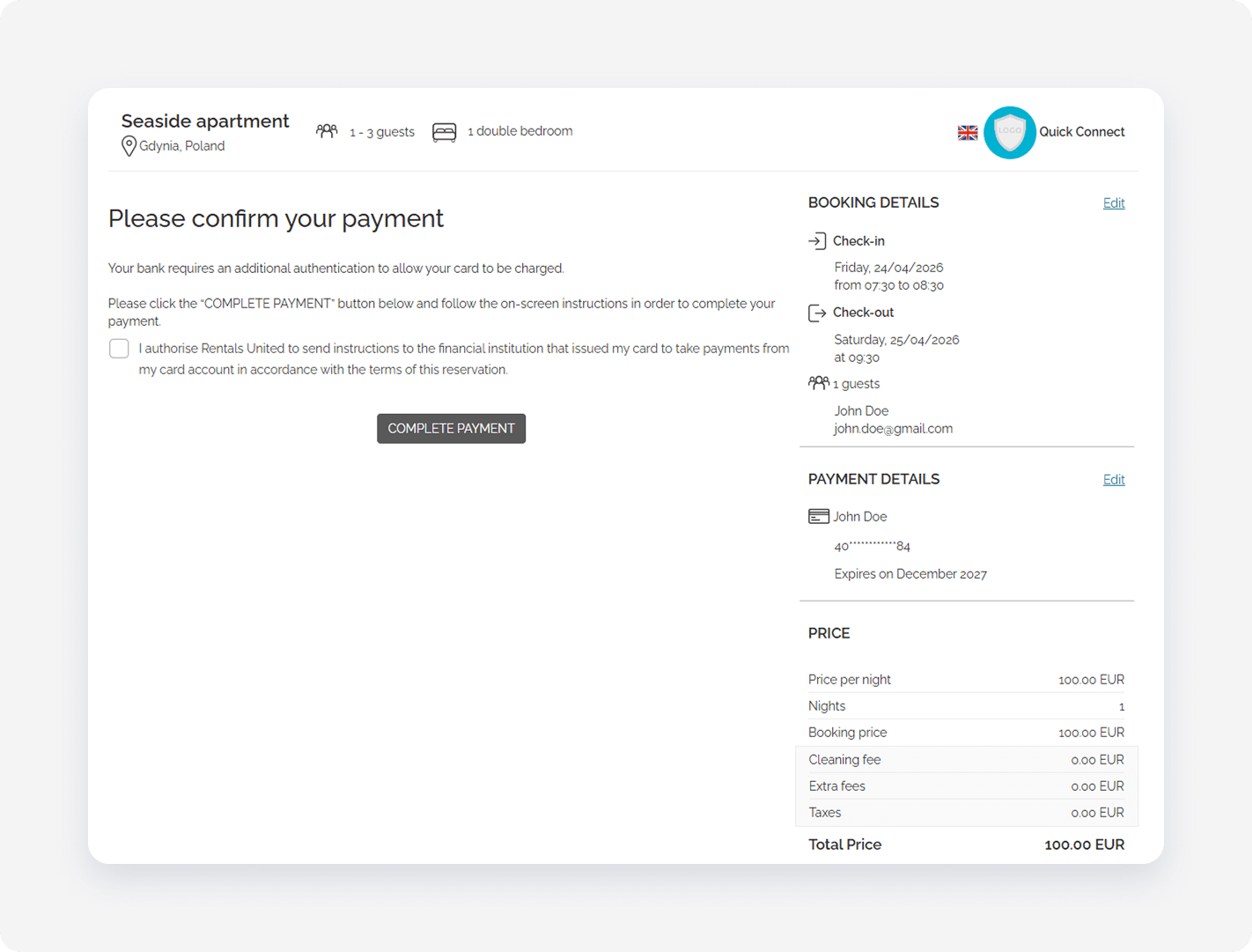
Post-Authentication Notification (webhook):
When a guest completes a deferred (3DS) payment, Rentals United will asynchronously notify your system via a webhook.
{
  "ChangeType ": "PaymentStatusUpdatedChange",
  "Timestamp": "2024-06-01T12:00:00Z",
  "Data": {
    "ReservationId": 123456,
    "IsSuccess": true,
    "TransactionId ": "tzn_hgjkg456",
    "Amount ": 60.00,
    "Currency ": "USD"
  }
}
Refund transaction
Use the Push_PutReservationRefund_RQ method to refund the transaction If you charge a reservation in multiple transactions, you can refund each of the transactions separately. Each transaction can be refunded only once.
Request:
| XML Path | Data Type | Type | Description |
|---|---|---|---|
| Push_PutReservationRefund_RQ | C | Root element | |
| Push_PutReservationRefund_RQ/Authentication | C,M | Authentication details | |
| Push_PutReservationRefund_RQ/Authentication/AccessKey | String(100) | M | Access key |
| Push_PutReservationRefund_RQ/Authentication/SecretKey | String(100) | M | Secret key |
| Push_PutReservationRefund_RQ/ReservationID | Integer | M | Unique reservation ID |
| Push_PutReservationRefund_RQ/TransactionID | String(32) | M | Unique Stripe transaction ID |
<Push_PutReservationRefund_RQ>
    <Authentication>
        <AccessKey>[AccessKey]</AccessKey>
        <SecretKey>[SecretKey]</SecretKey>
    </Authentication>
    <ReservationID>123456</ReservationID>
    <TransactionID>tzn_hgjkg456</TransactionID>
</Push_PutReservationRefund_RQ>
Response:
| XML Path | Data Type | Type | Description |
|---|---|---|---|
| Push_PutReservationRefund_RS | C | Root element | |
| Push_PutReservationRefund_RS/Status | String | M | See [`ListStatuses`](#list-statuses) |
| Push_PutReservationRefund_RS/Status@ID | Integer | M | See [`ListStatuses`](#list-statuses) |
| Push_PutReservationRefund_RS/ResponseID | String(32) | M | Unique response ID |
Success response:
<Push_PutReservationRefund_RS>
   <Status ID="0">Success</Status>
   <ResponseID>0123456789ABCDEF0123456789ABCDEF</ResponseID>
</Push_PutReservationRefund_RS>
Retrieve payment history
Use the Pull_ListTransactions_RS method to retrieve a detailed history of all payment attempts and current transaction statuses for a specific reservation.
Request:
| XML Path | Data Type | Type | Description |
|---|---|---|---|
| Pull_ListTransactions_RQ | C | Root element | |
| Pull_ListTransactions_RQ/Authentication | C, M | Authentication details | |
| Pull_ListTransactions_RQ/Authentication/AccessKey | String | M | Access key |
| Pull_ListTransactions_RQ/Authentication/SecretKey | String | M | Secret key |
| Pull_ListTransactions_RQ/ReservationID | Integer | M | The unique RU identifier of the reservation |
<Pull_ListTransactions_RQ>
    <Authentication>
        <AccessKey>[AccessKey]</AccessKey>
        <SecretKey>[SecretKey]</SecretKey>
    </Authentication>
    <ReservationID>12345678</ReservationID>
</Pull_ListTransactions_RQ>
Response:
| XML Path | Data Type | Type | Description |
|---|---|---|---|
| Pull_ListTransactions_RS | C | Root element | |
| Pull_ListTransactions_RS/Status | String | M | Result of the operation |
| Pull_ListTransactions_RS/Status/@ID | Integer | M | Status ID |
| Pull_ListTransactions_RS/ResponseID | String | M | Unique ID of the response |
| Pull_ListTransactions_RS/Reservation | C, M | Details of the reservation the transactions belong to | |
| Pull_ListTransactions_RS/Reservation/ReservationID | Integer | M | Unique reservation ID |
| Pull_ListTransactions_RS/Reservation/RemainingBalance | Decimal | M | Remaining outstanding balance for the reservation |
| Pull_ListTransactions_RS/Reservation/CurrencyCode | String | M | Currency code of the remaining balance (e.g., EUR) |
| Pull_ListTransactions_RS/Transactions | C, M | Collection of transaction records | |
| Pull_ListTransactions_RS/Transactions/Transaction | C, O | Individual transaction details | |
| Pull_ListTransactions_RS/Transactions/Transaction/TransactionID | String | M | Stripe Transaction ID |
| Pull_ListTransactions_RS/Transactions/Transaction/TransactionDate | DateTime | M | Date and time when the transaction occurred |
| Pull_ListTransactions_RS/Transactions/Transaction/Amount | Decimal | M | Amount processed in this specific transaction |
| Pull_ListTransactions_RS/Transactions/Transaction/CurrencyCode | String | M | Currency code of the transaction |
| Pull_ListTransactions_RS/Transactions/Transaction/Status | String | M | Current status of the transaction (e.g., Success, Deferred) |
| Pull_ListTransactions_RS/Transactions/Transaction/Type | String | M | Type of transaction (e.g., PayIn) |
<Pull_ListTransactions_RS>
    <Status ID="0">Success</Status>
    <ResponseID>daf280680c3542f8a98485e873112c51</ResponseID>
    <Reservation>
        <ReservationID>12345678</ReservationID>
        <RemainingBalance>45.5000</RemainingBalance>
        <CurrencyCode>EUR</CurrencyCode>
    </Reservation>
    <Transactions>
        <Transaction>
            <TransactionID>ch_3TCcamEwrhSRv1Kq1mpQtquT</TransactionID>
            <TransactionDate>2026-01-01 09:10:12</TransactionDate>
            <Amount>50.0000</Amount>
            <CurrencyCode>EUR</CurrencyCode>
            <Status>Success</Status>
            <Type>PayIn</Type>
        </Transaction>
        <Transaction>
            <TransactionID>pi_3T7vHYEwrhSRv1Kq1V3CEUMh</TransactionID>
            <TransactionDate>2026-01-01 10:06:56</TransactionDate>
            <Amount>30.0000</Amount>
            <CurrencyCode>EUR</CurrencyCode>
            <Status>Deferred</Status>
            <Type>PayIn</Type>
        </Transaction>
        <Transaction>
            <TransactionID>ch_3TCdBIEwrhSRv1Kq0yk3ptBj</TransactionID>
            <TransactionDate>2026-01-01 11:47:56</TransactionDate>
            <Amount>4.5000</Amount>
            <CurrencyCode>EUR</CurrencyCode>
            <Status>Success</Status>
            <Type>PayIn</Type>
        </Transaction>
    </Transactions>
</Pull_ListTransactions_RS>
FAQ
We're considering charging the full amount 30 days before the stay. Is there any constraint from the channel side we should be aware of? Or are we fully free to define our own charge timing rules? Expedia and Booking.com very often activate virtual credit cards on the day of the check in. So if you attempt to charge 30 days before arrival, the charge will be rejected. After a reservation is made, our RLNM notification includes details about the VCC activation date, so you can design appropriate rules. See Viewing credit card details for non-PCI compliant partners.
Is the refund always for the full transaction amount or are partial refunds supported? You must provide the Transaction ID when processing refunds. If one booking was split into two charges - 50% at the moment of booking and 50% at 10 days before arrival, then these are two separate transactions and you must refund them separately (they will have two separate Transaction IDs). However you can’t partially refund the first charge (for example refund only 25%).
If a reservation is modified and the total price changes, how should we handle it? You should make the new charge. The system will not allow you to charge more than the reservation value.
Will the API be available in a staging environment so we can test the integration before going live? It won’t be available in staging, but you can create test bookings on the channel to test the integration and then proceed with the refunds.