Before your property managers start using Stripe payments as the primary payment processor, you must enable Stripe in your system. This article guides you through the technical implementation of Stripe payments for White Label.
Prerequisites
- Active White Label partnership
- Stripe for White Label contract signed
- Access to Stripe charging methods via XML API
- Webhook handler URL for Stripe notification to be provided to Rentals United
- Optional: Redirect URL to be provided Custom redirect flow (optional)
WL partner requirements
The table below shows the components that the White Label you need to build in your PMS.
| Component | Required | Purpose |
|---|---|---|
| “Connect to Stripe” button | Yes | Triggers Stripe onboarding redirect |
| Webhook handler | Yes | Processes connection status notifications from Rentals United |
| Reservation ID page | No | Identifies the booking for charge/refund operations. Unnecessary in case of automated payments |
| “Charge” button + % amount field | No | Initiates a payment charge. Unnecessary in case of automated payments |
| “Refund” button % amount field | No | Initiates a refund against a prior transaction. Unnecessary in case of automated payments |
| Transaction history display | Recommended | Shows charges, refunds, and statuses per reservation |
| 3DS redirect handling | Yes | Manages challenged transactions for guest card verification |
| API methods implementation (charge, refund, check connection status and disconnect) | Yes | To perform charges, refunds , transaction and connection checks |
| Payment automation | No | To implement automated payments rules |
| End-user email notifications | No | To inform the end-user about successful or failed connection to Stripe and successful, failed or challenged payments |
Exemplary partner implementation
Managing guest payments efficiently requires a seamless integration with Stripe. Setting up your Stripe account within your PMS allows you to process payments without the need to log out from your PMS.
Below you can find an exemplary implementation of the Stripe connect in our partner's PMS interface. 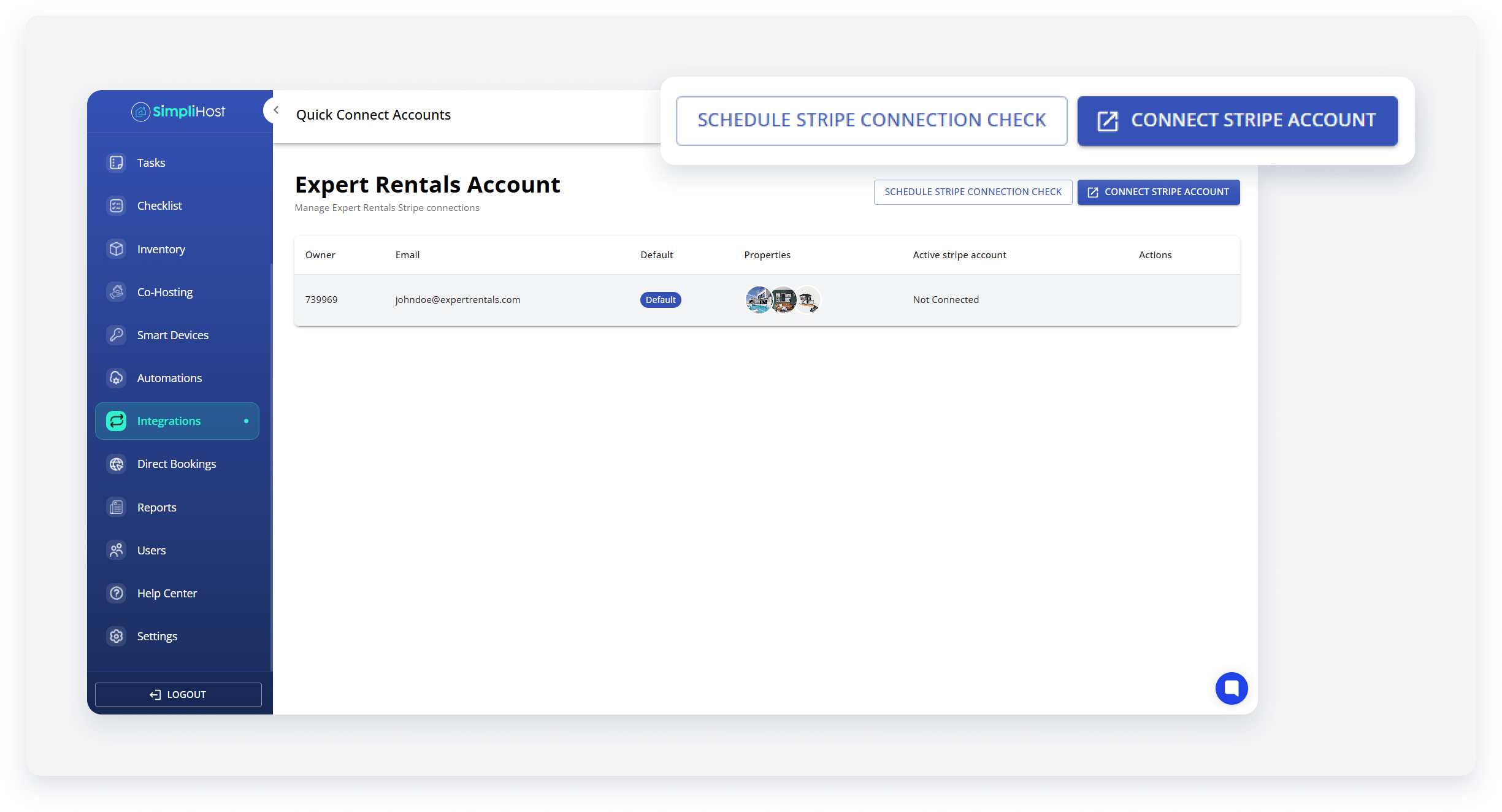
Stripe connection models
Depending on your workflow, you have two options for building the Stripe integration. Understanding these models is essential for managing how payments are routed to different property managers within your system.
Connection based on the Owner
This is the most common model for property management systems. It allows a single User account to connect multiple Owner IDs to Stripe independently. Each Owner ID maps to its own unique Stripe account, ensuring that funds from specific properties are directed to the correct bank account. This model is recommended for PMS partners who have multiple end-user accounts.
| User ID | Owner ID | Stripe Account ID | Status |
|---|---|---|---|
| 1234 | 5689 | (not connected) | — |
| 1234 | 9632 | acct_9875 | Connected |
| 1234 | 4411 | acct_2201 | Connected |
Owner IDs
You can create Owners for your User by calling the Push_PutOwner_RQ API method. Then, ensure that the correct Owner is associated to the property in Push_PutProperty_RQ API method. To retrieve the Owner ID, use the Pull_GetOwnerDetails_RQ API method.
By default, the Owner ID is for your User is identical as your User ID (if you haven’t created Owner ID).
Connection based on the User
In this model, the connection is managed at the top-level User account. All properties under that User share the same Stripe connection. This is typically used when a single management company collects all guest payments into one central account rather than distributing them to individual property owners.
Trigger connection to Stripe
As a WL partner, you trigger the connection process from your interface. Rentals United generates a unique Stripe connection URL. You need to display it in your system, such as through a dedicated button.
Base URL
https://rm.rentalsunited.com/api/PaymentGateways/StripeConnectHandler.ashx
Query parameters
| Parameter | Required | Description |
owner_id |
Yes |
Your unique Owner identifier in Rentals United (integer). If you have multiple Owners, implement the link for each of them. If you don’t have Owners or you want to enable Stripe only for your User account, provide here your UserID instead of OwnerID. See here. |
redirect_url |
No | A custom URL where the user should be redirected after the process is completed. See how to set it up here. |
Example URLs
https://rm.rentalsunited.com/api/PaymentGateways/StripeConnectHandler.ashx?owner_id=123456-
https://rm.rentalsunited.com/api/PaymentGateways/StripeConnectHandler.ashx?owner_id=123456&redirect_url=https://your-domain.com/stripe-callback
Custom redirect flow (optional)
If you provide the redirect_url parameter, Rentals United will redirect the user back to your specified address upon completion. We will append a status parameter to your URL:
-
Success:
[your_redirect_url]?status=success -
Failure:
[your_redirect_url]?status=failed -
Invalid owner:
[your_redirect_url]?status=invalid_owner -
Already connected:
[your_redirect_url]?status=already_connected
Stripe account setup
End users are responsible for finishing the setup within Stripe. They can choose to create a new Stripe account or sign in to an existing one to link it to your platform.
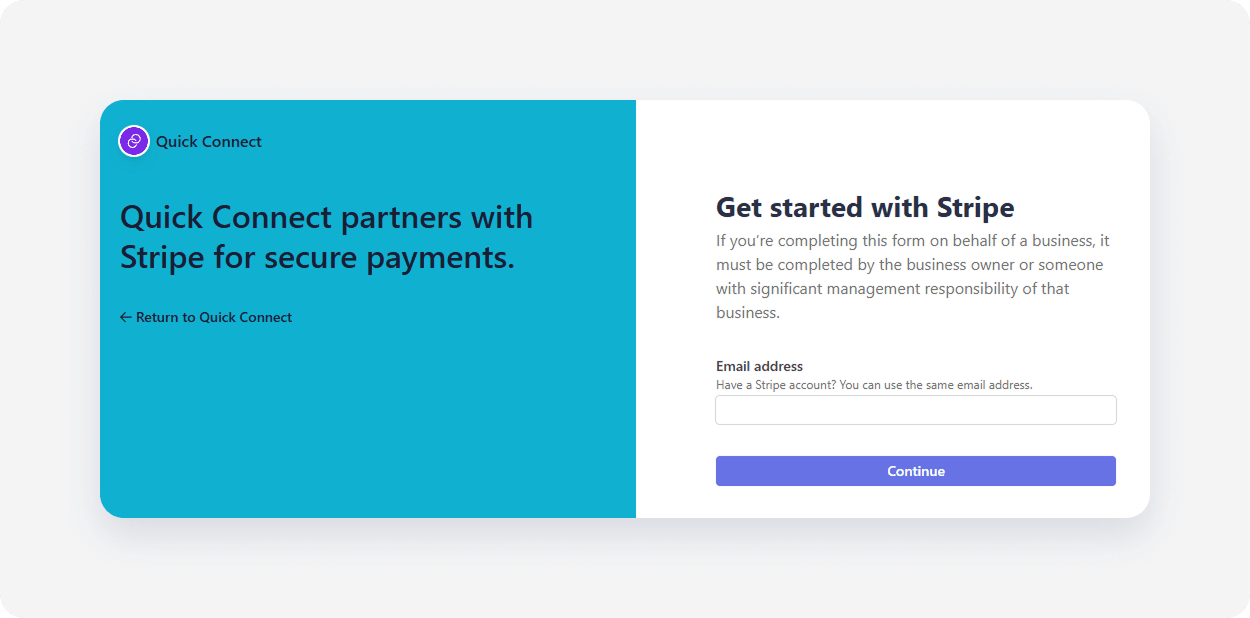 After onboarding, the user is redirected to the Rentals United landing page.
- Success: "You have successfully connected your Stripe account"
- Failure: "The Stripe connection has failed. Please contact the support."
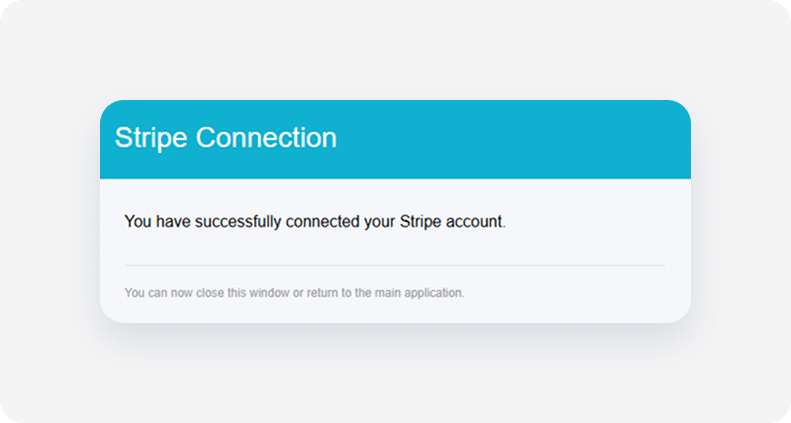
Note: If you provide a redirect_url parameter, Rentals United redirects the user back to your specified address with a status=success or status=failed parameter appended. See Custom redirect flow (optional).
Build webhook handler
After a property manager connects to Stripe, Rentals United informs WL partner PMS via a webhook notification. WL partner needs to build an endpoint that will receive the status notifications from Rentals United.
Create an endpoint where Rentals United sends the connection statuses (connection successful, failed) and provide it to your Rentals United representative. Manual subscription via the XML API is currently not available for this specific notification type.
Example JSON payload
{
  "ChangeType ": "ServiceConnectionStatus",
  "Timestamp": "2024-06-01T12:00:00Z",
  "Data": {
    "ServiceId": 554276,
    "IsSuccess": true,
    "UserId": 98765,
    "OwnerId": 12345,
    "StripeAccountId": "acct_1V86LIE1e8dIoLM"
  }
}| Property | Type | Description |
Type |
String | Notification type. For this process, it is always ServiceConnectionStatus. |
ServiceId |
Integer | Internal ID of the service (for example Stripe Service ID). |
IsSuccess |
Boolean | Subscription status; true if the subscription was successful, falseotherwise. |
UserId |
Integer | Rentals United User ID. |
OwnerId |
Integer | Owner ID (provided in the initial request). |
Charge API methods implementation
When receiving a reservation, Rentals United is responsible for credit card tokenization and transaction logging, ensuring that sensitive data is not shared with the WL partner.
To handle payments after a user connects their account, implement the charge and refund API methods and display them in your system on a dedicated reservation details page.
- Charge: Push_PutReservationCharge_RQ
- Refund: Push_PutReservationRefund_RQ
- Transactions retrieval: Pull_ListTransactions_RQ
Find detailed implementation steps with exemplary payloads here.
Platform limitations after enabling Stripe
Once you enable Stripe payments via the API for at least one account, the native payment solution within the platform is disabled for the parent account and all associated child accounts.
This means:
- Inactive buttons: The Charge and Refund buttons in the reservation view become inactive.
- Service visibility: Stripe will no longer appear in the list of available services.
- Automated payments: Users can’t set up automatic payments within the platform. Rules for automated payments should be built using API.
FAQ
Can I enable Stripe payments for multiple users in my account? Yes. Each user within an account has a dedicated OwnerID. Each OwnerID can have a separate Stripe account created and manage their charges independently.
Can I enable Stripe payments for my entire account? Yes. If you don’t have child accounts in your setup, you can use your account UserID to enable Stripe for your account.
What happens if I disconnect Stripe? If you disconnect the integration, any scheduled payments or automated refunds will stop immediately. You will need to process any outstanding transactions directly within the Stripe dashboard.
For which channels will the Stripe payment API be available?For all sales channels where the host is the merchant of record and credit card details are being passed