If you stopped managing a property and no longer need to sync data between Rentals United and Airbnb, remove the listing connection. Removing a listing stops the communication between platforms, ensuring your account remains accurate and up to date.
Before you start
Before you remove the listing connection in Rentals United, make sure you deleted the listing in the Airbnb dashboard. To do it, contact the Airbnb Support Team.
Remove the listing connection
Follow the steps below to remove a listing connection.
Step by step:
In Rentals United platform, open Property Settings. Follow the steps here.
- Search for the listing you want to remove.
-
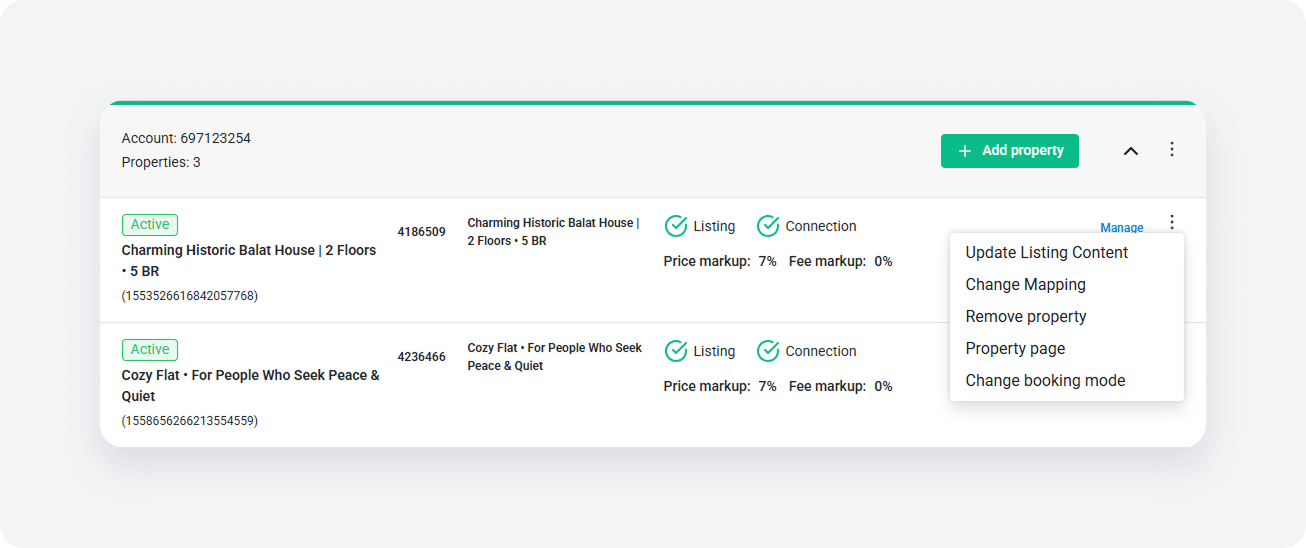
Click the three dot menu on the right and select the Remove property option.
-
In the popup, click the Confirm removal button.
Note: In case your listing is still available in Airbnb, a popup informs you to remove the listing from Airbnb first.
Archiving the property
If you removed the listing connection, you can now safely archive the property in the Rentals United system. Follow the steps in here.
Note: If you archived a property before removing the listing connection, Rentals United blocks your property's availability in Airbnb. You won't receive bookings, but your listing will still be listed in the Airbnb website. To remove the listing from the Airbnb website, contact the Rentals United Support Team.