Configure how fees and taxes sync from Rentals United to Airbnb to ensure accurate pricing and guest billing. Depending on when you connected your account, you use a legacy solution or the latest version, "Airbnb fees and taxes v3".
Understanding fee versions
Airbnb fees and taxes v3
Airbnb "fees and taxes v3" is the most advanced and recommended solution. It provides complete coverage for all fees and taxes while preserving all Airbnb functionalities.
Automatic activation: Accounts connected after August 10, 2023, have this version enabled by default.
Legacy solutions
If you connected your account before August 2023, you might still use "fees v1" or "fees v2." These versions are no longer under development. We recommend upgrading to version "fees and taxes v3" to ensure your listings remain compatible with all Airbnb features.
Enable fees and taxes v3
Follow the steps below to upgrade to "fees and taxes v3".
Important:
If you previously managed taxes directly in Airbnb, remove them from the Airbnb dashboard before switching to "fees v1", "fees v2" or "fees and taxes v3". If you don't, the system adds the new taxes to the old ones, resulting in double taxation for your guests.
Step by step:
- In Rentals United account, open Channel Settings. Follow the steps here.
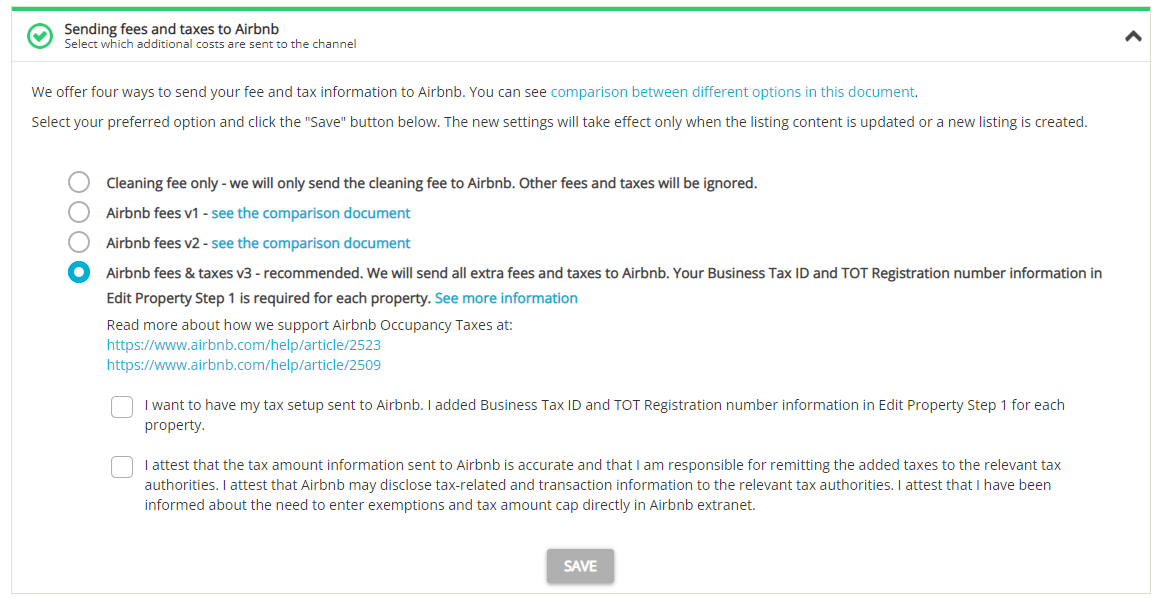
Scroll to the "Sending fees and taxes to Airbnb" section.
-
Select the Airbnb fees & taxes v3 option.
Note: Once you are on "fees and taxes v3", it is not possible to downgrade to other options.
-
Add the license tax information for all your properties. See requirements for all regions here.
Note: If you upgrade to "fees and taxes v3", but your properties doesn't have the required tax information provided, you'll see receive an error and we won't sync your tax details to Airbnb. If you skipped this step, provide the required data and sync update your listings.
- Check all boxes to confirm the upgrade.
Click Save.
Update your listings content or wait until the automated listing content update is finished.
We sync your fees and taxes with Airbnb according to this table. For more details regarding setting fees and taxes and their sync to Airbnb, see here.