Editing the rates info directly in the channel don't sync back to Rentals United. If your listings display differently on the channel website, sync changes from the channel to Rentals United to ensure the listing displays identical information in both places.
You can sync the changes from the channels, such as Booking.com, Agoda, Expedia, Emerging Travel Group and other channels with a hotel setup. You can't sync the changes from Trip.com only.
Refresh hotel rates
Syncing changes for a given hotel updates all its room types and rates in Rentals United.
Step by step:
In your Rentals United account, open Property Settings. Follow the steps here.
- Navigate to the hotel you want to sync.
-
On the hotel level, click the three dot menu and choose Refresh synchronization settings.
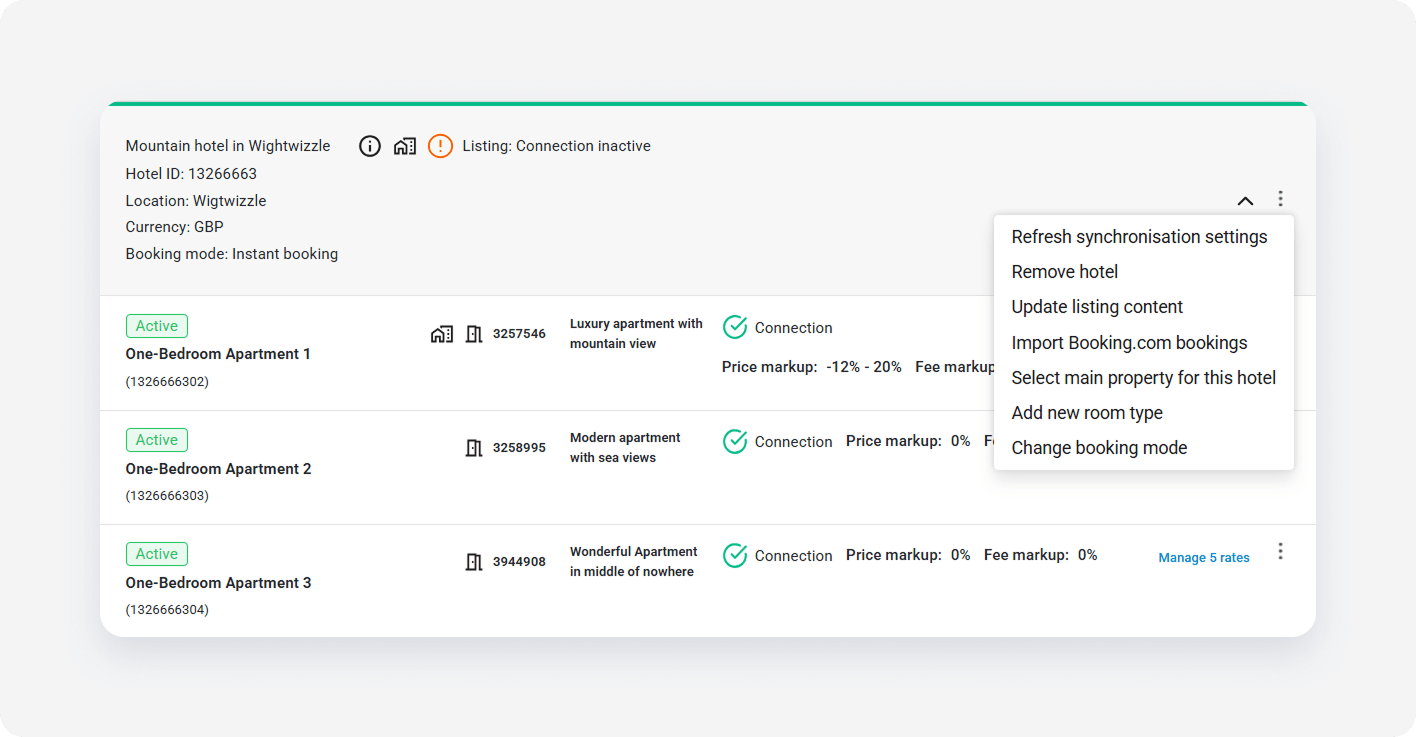
- In the popup, click Proceed to confirm the action.
- The system syncs the current rate configuration to Rentals United.
- Review the summary of changes and click I understand.
- If the system finds additional rate plans in the channel, it creates them in Rentals United in the "Inactive" status. You need to activate the new rates plans in Rentals United..
- Rate plans without any corresponding rate plans in the channel are removed from Rentals United.
Refresh room types rates
Instead of syncing rate plans for an entire hotel, you can sync rate plans assigned to an individual room type.
Step by step:
In your Rentals United account, open Property Settings. Follow the steps here.
- Navigate to the room type you want to sync. Click Manage rates.
- Click the Refresh rate info or Sync button.