Custom payment schedule allows you to charge reservations coming from Expedia in installments. The settings works for all your properties connected to Expedia.
Step by step:
- In Rentals United account, open Channel Settings. Follow the steps here.
- Navigate to the Custom Payment Schedule section.
- Select Enable Custom Payment Schedule for all properties option.
-
Provide the percentage of the total price the guest pays at the booking. The outstanding percentage to pay at arrival updates automatically.
Note: Expedia requires at least one payment before the guest arrives. You can't charge total reservation price only upon arrival.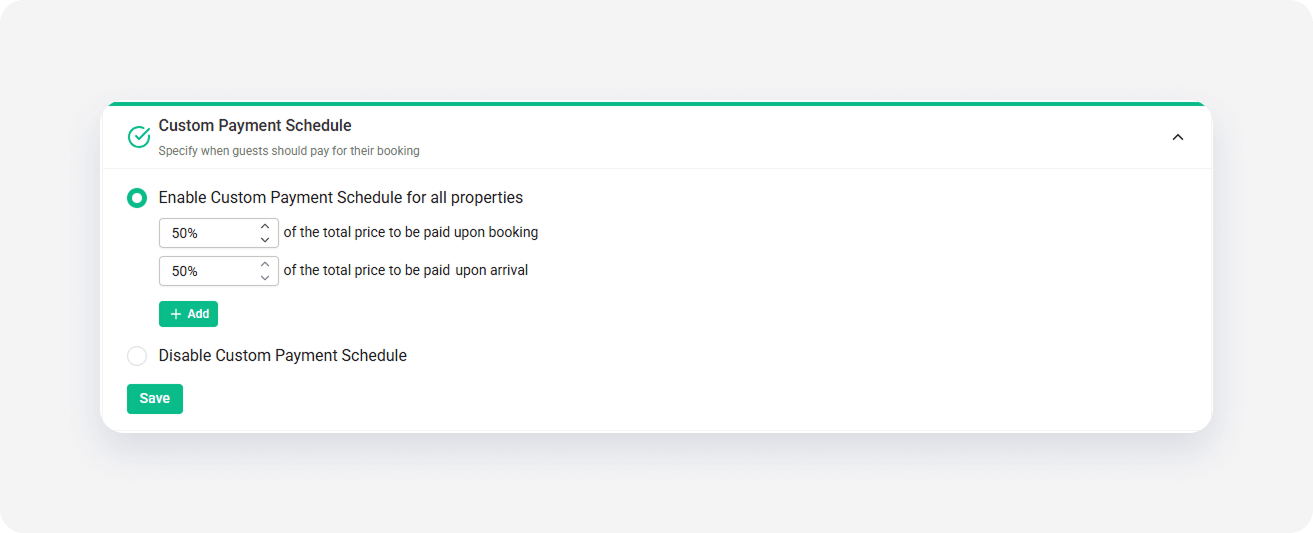
-
To add more levels to the Custom Payment Schedule, click + Add. Provide the percentage and the number of days before the arrival when the payment must be made.
Note: You can schedule up to 4 payments.
- Click Save.
- Update the listing in Expedia.
x