Now you can check what status your listing has in Expedia and quickly identify potential connection issues.
The status is displayed on the hotel (cluster) level and contains the listing status and the last status check timestamp. The status gets updated every day, but you can also refresh the status manually. You will see two statuses possible:
- Active - indicates that the hotel is active and bookable on Expedia website
- Inactive - indicates that there is a connection error which affects the connection. In this case, you should check the errors on the room (property) level and follow the steps described in the error message to clear them away.
According to Expedia, the errors may be related to payment issues or overdue invoices, compliance issues, recontracting, incomplete onboarding or renovations). If the instructions are unclear, contact the Rentals United Support Team.
Step by step:
In your Rentals United account, open Property Settings for Expedia. Follow the steps here.
-
Locate a Listing status icon on the hotel level.
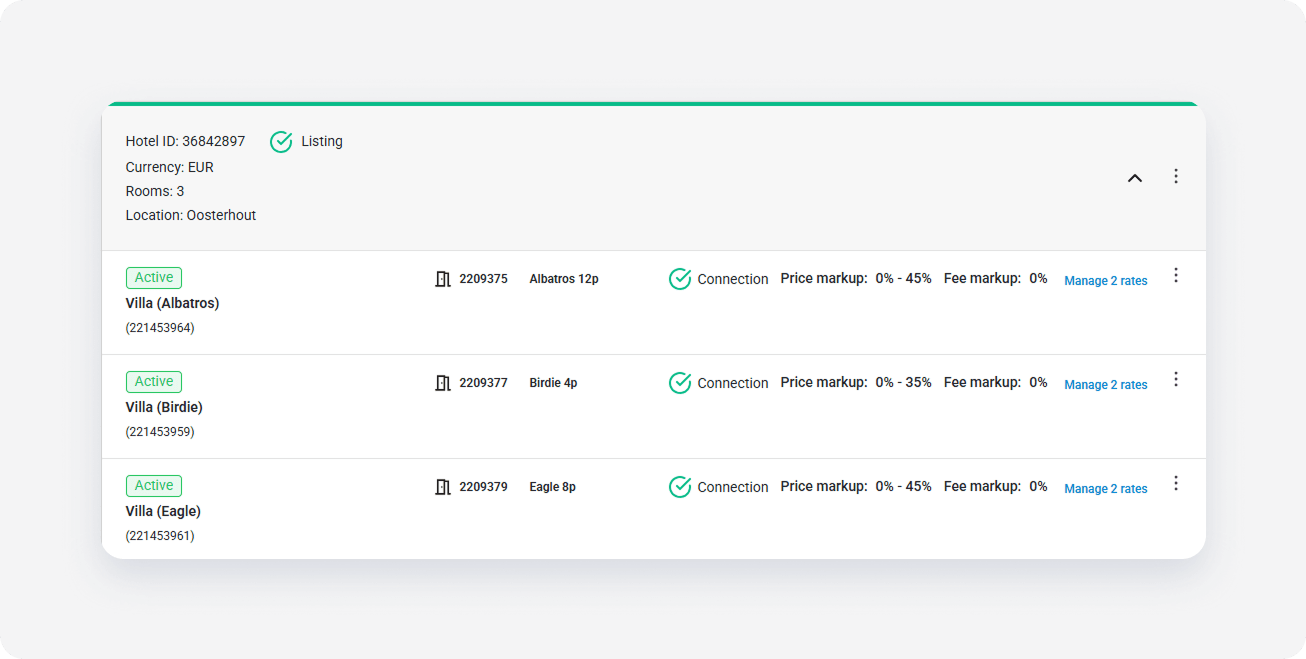
- Hover over the icon to see the details of the connection status.
To fetch the latest listing status from Expedia, click the three-dot menu and select Refresh listing status. The listing status and the timestamp update.
To preview your listing on the Expedia website, select the Property page option from the three-dot menu.
x