Importing existing bookings from sales channels to Rentals United ensures all reservation information remains centralized. Rentals United copies these existing bookings directly from Airbnb to streamline property management.
Overview of booking imports
Rentals United only imports bookings held for future dates. This action creates a reservation in Rentals United, copies the reservation data from Airbnb and blocks availability at those dates.
If you already imported a given booking and import it again, the system updates the booking with new details to avoid duplicates.
Importing bookings
Follow the steps below to import bookings created before you started using Rentals United or connected Airbnb to your account. Any new bookings made on Airbnb automatically sync to Rentals United without any need to manually import them.
Before you start
Follow the steps below to import bookings from Airbnb.
Step by step:
In Rentals United platform, open Property Settings. Follow the steps here.
-
Navigate to the hotel you would like to import bookings for.
Note: You can import bookings for the whole hotel only. This means it will import bookings from all listings added to one hotel. If you have more hotels, you need to repeat it for each of them. - Click the three-dot menu on the hotel level and select Import Airbnb bookings.
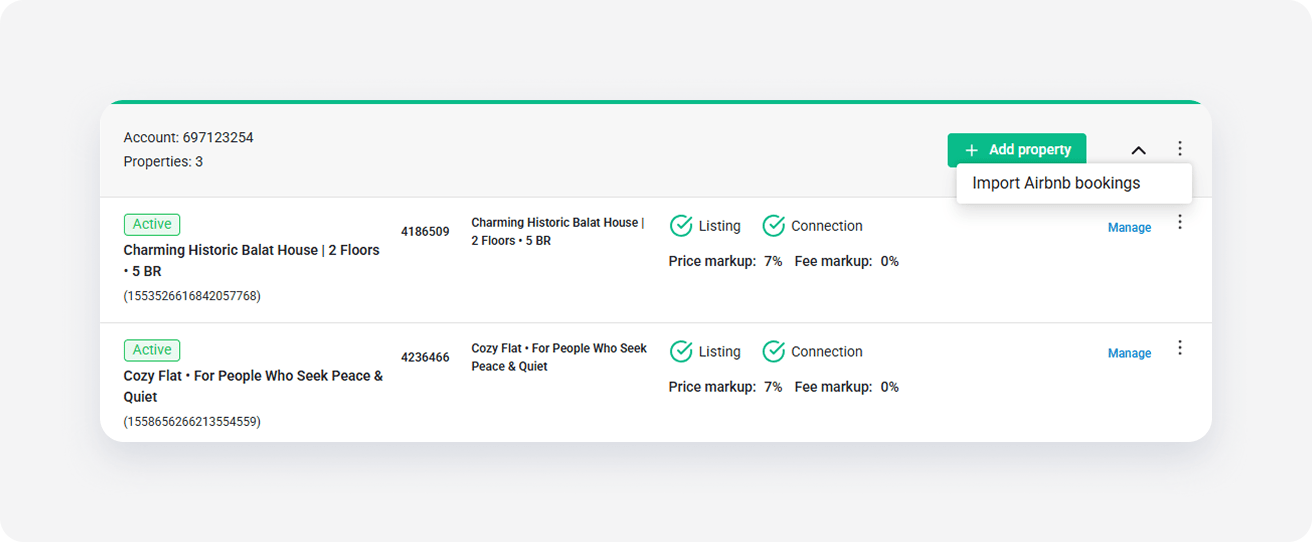
- Click Proceed & Import to confirm the import.
- The import starts.
Don't exit the page. Once the import is complete, the page reloads. Verify if new bookings successfully copied to Rentals United.
If you see an error, try importing steps again. If the error persists, contact the Support Team.
Imported bookings
Standard modification and cancellation rules apply to imported bookings.