Bookings created manually in Rentals United block the availability in sales channels. Sales channels do not have access to the booking details. Vrbo does not have access to these details either - unless you transfer it to Vrbo. It allows you to link a reservation existing in Vrbo with a manual booking created in Rentals United and manage all your bookings from one place (including modifications and cancellations).
Mandatory: Any bookings that existed in Vrbo before you connected to Vrbo through Rentals United.
If you have already received future reservations in Vrbo and then connected to Vrbo through Rentals United, you will need to recreate these Vrbo bookings in Rentals United and transfer them to Vrbo. In this case, you should reach out to Vrbo for a list of reservations that you need to transfer.
- Bookings made offline, such as at the reception desk or through a phone call
- Bookings not created in Vrbo due to a sync error.
Before you start
- Make sure Vrbo is added to your account in 'Services' and the property is connected to Vrbo - see here.
- Make sure the reservation details in the reservation created in Rentals United are identical as in the reservation available in Vrbo.
- Make sure the reservation's price is not '0'. If the price is '0', you will need to change it before transferring to Vrbo.
- Transferring reservations is available only for reservations created manually and in the 'Confirmed' status.
- To speed up the process, instead of creating each booking manually, you can create multiple bookings via Push_PutConfirmedReservationMulti_RQ API method.
Step by step:
- Create an offline reservation in Rentals United. Follow the steps here.
Once the booking is created, click Booking actions and choose Transfer to Vrbo.
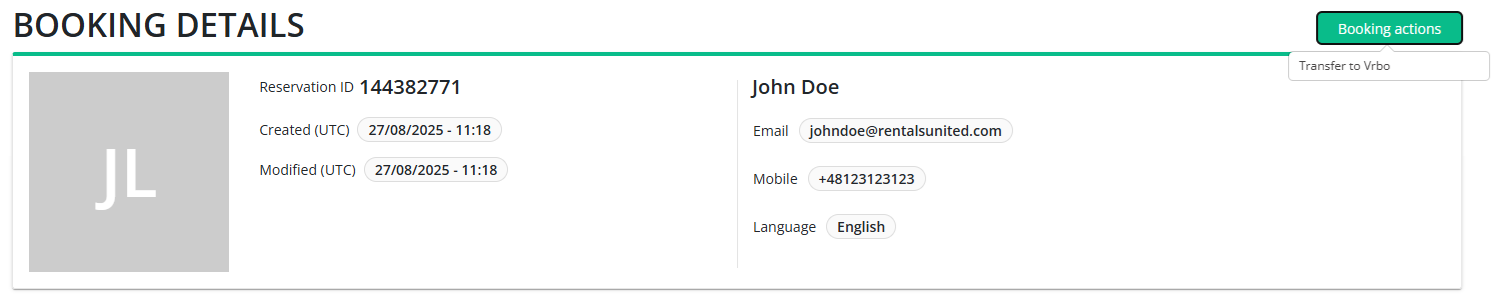
Confirm the action by clicking Transfer to Vrbo.
- You will see a confirmation pop-up if the action was successful. Click Proceed.
After the process is complete, Vrbo will link the reservation in their system to the reservation that you have just created and transferred. Thanks to it, you can manage the reservation directly in Rentals United. Note that this reservation will be marked as it originated in Vrbo and Vrbo will charge the commission on this booking according to your contract.