Learn how Booking.com promotion stacking works, how stacked promotions calculate, and how guest booking conditions affect final rates.
Discount stacking rules
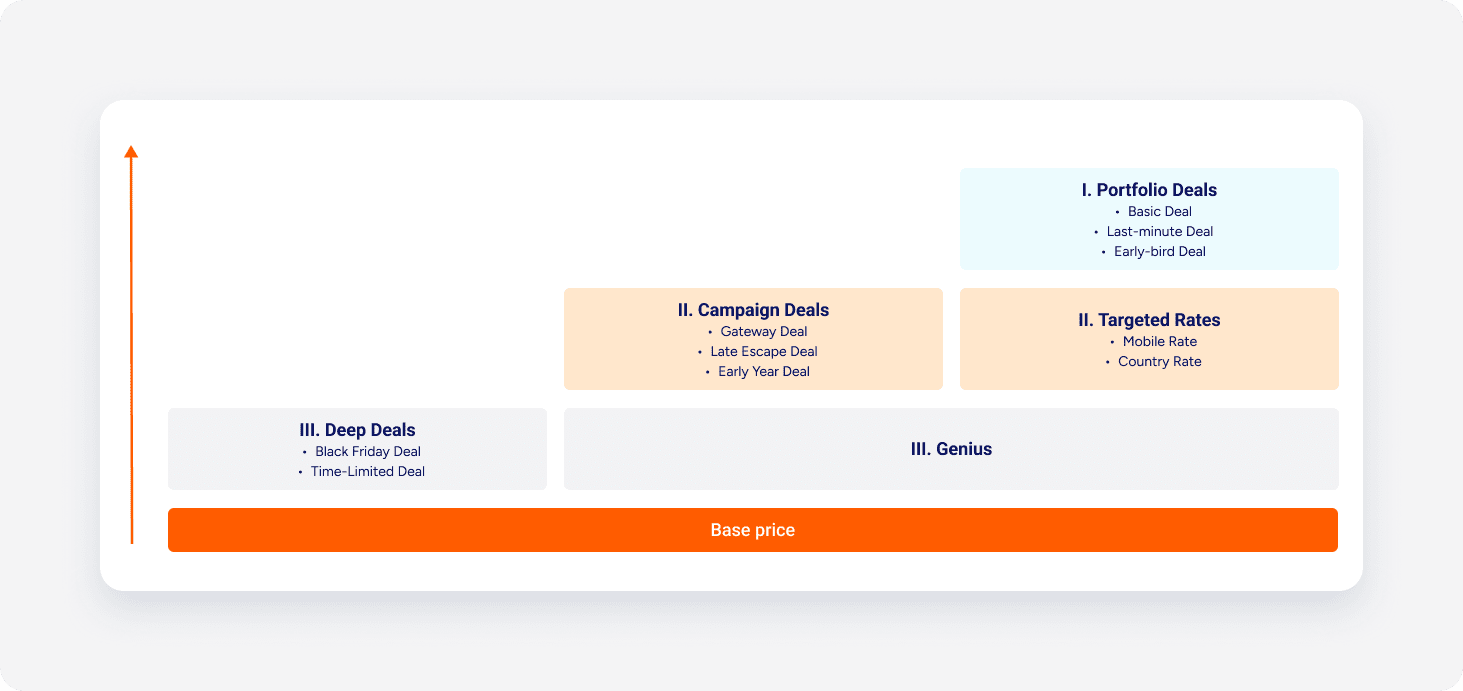
Each promotion belongs to one category (portfolio deals, campaign deals, targeted rates). Promotions from different categories stack one after another. Promotions within the same category don't stack, and the system applies only the single highest discount from that category.
Additionally, different discount categories interact with each other:
- Deep deals, such as Black Friday Deal and Limited-time Deal never stack with other promotions
- Genius stacks with other categories, such as Campaign Deals and Portfolio Deals, as they are applied.
Note:
A maximum of three promotions can stack in a single booking.
Calculate stacked discounts
When a booking qualifies for multiple discounts, only the largest discount in category applies. Discounts apply one after another.
When a booking qualifies for three stacked discounts, calculations follow this sequence:
- The first discount applies to the base rate.
- The second discount applies to that new discounted rate.
- The third discount applies to the remaining balance.
For example, a $100 base rate receiving three sequential 10% discounts decreases to $90 after the first discount, $81 after the second, and $72.90 after the third.