Offer guests a nonrefundable booking option to protect your revenue and stay competitive. A nonrefundable rate is a discount applied on top of your existing cancellation policies and other discounts. When guests choose this option, they receive a lower price in exchange for waiving their right to a refund if they cancel.
Read more how nonrefundable rate work in the Airbnb Help Centre.
Important notes
Before setting up nonrefundable rates, review the requirements and limitations.
-
Availability and scope:
Nonrefundable rates are enabled at the account level and apply to all current and future listings.
Nonrefundable rates are not available for Luxe apartments.
Nonrefundable rates are not available in the "Limited Sync" mode - see here.
Nonrefundable rate visibility: You won't see the nonrefundable rate in the Rentals United account. It only appears in the Airbnb dashboard.
If any of your listing are not eligible for a nonrefundable rate, the system won't display an error message, and the process will appear successful. If the rate does not appear on Airbnb, verify the listing is eligible for a nonrefundable rate before troubleshooting further.
Enable nonrefundable rate
Follow the steps below to set up a nonrefundable rate discount for your Airbnb listings.
Step by step:
- In Rentals United account, open Channel Settings. Follow the steps here.
-
Search for the Nonrefundable rate discount section and find the account where you want to enable a nonrefundable rate.
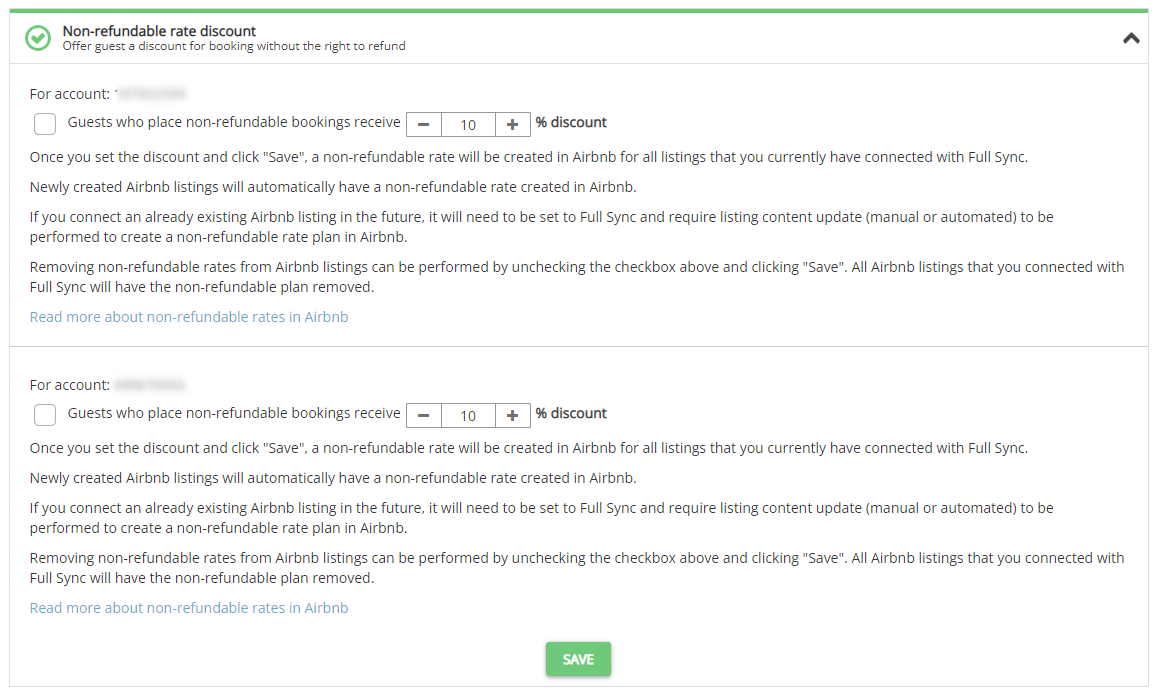
- Check the checkbox and set the discount value.
- Click Save.
- Update the listing content or wait until the next Automatic listing content runs to see a nonrefundable rate in your listing in Airbnb.
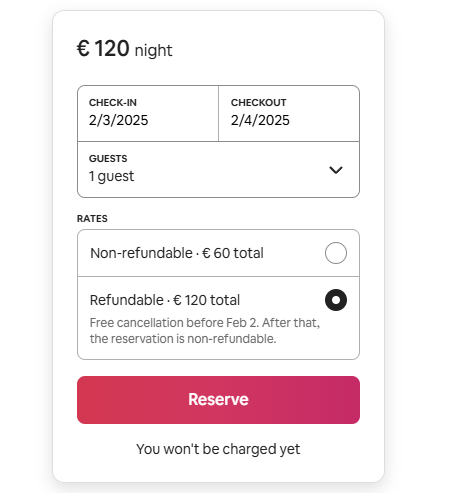
After successfully setting up a nonrefundable rate discount, your guests will see two booking options after having selected your property to book:
- Refundable
- Nonrefundable (less expensive)
Managing non-refundable rates
Understanding the final price
Airbnb applies the discount to the final booking price after fees, taxes, and other discounts. For example, if the refundable price is $150 and you set a 10% discount, the non-refundable rate shows as $135.
Inactive listings
If you activated a nonrefundable rate for inactive listings, you must update the listing content to apply the nonrefundable rate. Follow the steps here.
Removing the discount
To stop offering nonrefundable rates, uncheck the nonrefundable rate box in your Channel Settings and click Save. The option is removed from Airbnb automatically.