Positive reviews are the key factor in improving your search ranking and attracting more bookings on Airbnb. However, manually reviewing every guest is time-consuming.
Rentals United offers an automated review feature that sends a positive rating and a customized message to your guests on your behalf. This encourages guests to leave a review in return, as they are often curious to see the feedback you provided.
Timing: The review is automatically sent eight days after the reservation ends.
Rating: The system submits a 5-star rating for cleanliness, communication, and house rules.
Content: The review includes a generic positive text that you can customize.
Enable automated reviews
Follow the steps below to enable automated guest reviews.
Step by step:
- In Rentals United account, open Channel Settings. Follow the steps here.
Scroll down to the Automated reviews section.
In the Review template field, enter your customized review text.
Toggle on the Enable automated reviews switch.
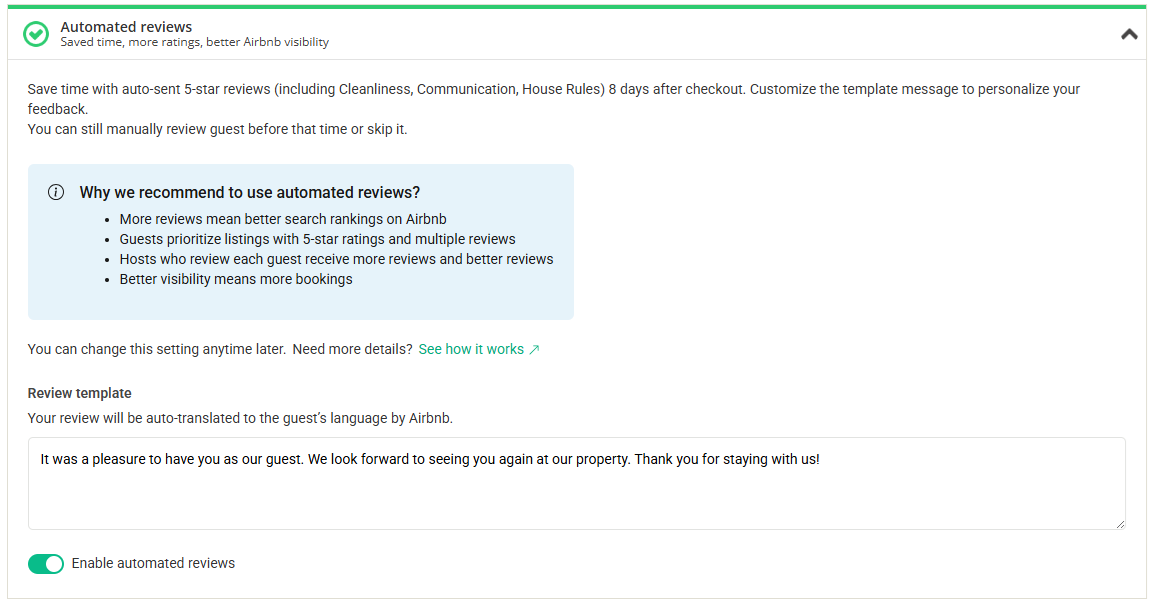
Click Save.
Writing your review template
When creating your template, keep the message generic since it applies to every guest. Follow these guidelines:
Don't include specific details like guest names or property names.
Don't include phone numbers, URLs, or email addresses.
Don't leave the field empty.
Tip:
Use a simple message like: "Thank you for being a great guest! We genuinely appreciated hosting you and look forward to welcoming you back in the future."